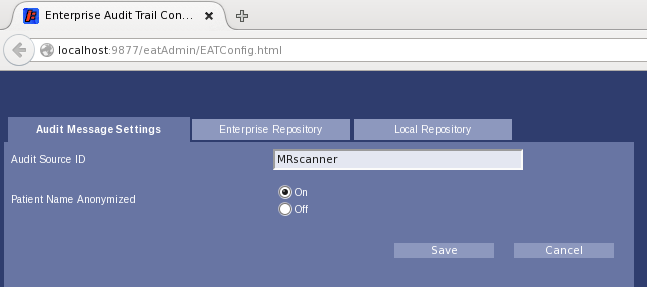
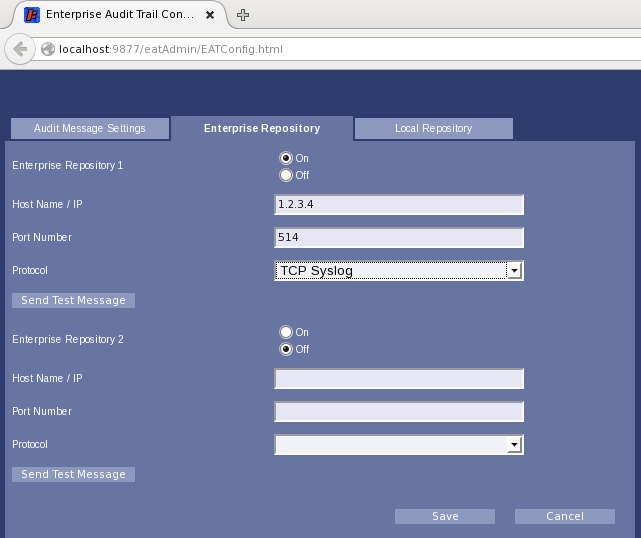
Enable remote logging of the audit messages.
Procedure
- Start the EAT config utility using the
firefox localhost:9877/eatAdmin/EATConfig.html command. - Assign a source ID for the scanner on the Audit Message Settings tab.
- Click Save.
- Click Enterprise Repository to switch to that tab.
- Toggle the Enterprise Repository 1 radio button to On.
- Fill in the remote (collector) Host Name/IP. Contact site IT for IP address.
- Fill in the remote (collector) Port Number.
- If a port other than 514 is used for remote syslog, a corresponding modification to the firewall rule configuration is required. The firewall is configured by default to allow only certain outbound destination ports.
The file to modify is /usr/share/gehc_security/pnf/modality.sh. It contains instructions and standard iptables commands. Specific to syslog, modify the following lines in that file.
# Below for remote syslog
$IPTABLES -A OUTPUT -p udp -m udp --dport 514 -j ACCEPT
$IPTABLES -A OUTPUT -p tcp -m tcp --dport 514 -j ACCEPT
- Select the protocol for the remote (collector) server communications.
- TCP-BSD
- TCP-IETF
- UDP-BSD
- UDP-IETF
- TLS-BSD
- TLS-IETF
Note: TLS selection is only available on software version 29 and later and requires that the third party trust certificate from the facility EAT collector server has been imported into the MR system and has been configured for EAT application using the Certificate Management interface, see
Importing third-party certificates - public keys.
- Click Save.