Removing the Patient Handling Power Supply (PHPS) 2
Procedure
Open the penetration cabinet door far enough to provide clearance and access to the inside of the cabinet.
Note: The door can be removed if there is not enough space to open it enough for clearance. Disconnect the ground wire and lift the door up and off the hinges and away from the cabinet.
Disconnect the cables from the front of the PHPS 2.
Disconnect the fiber optic cable from the front of the fiber optic interface.
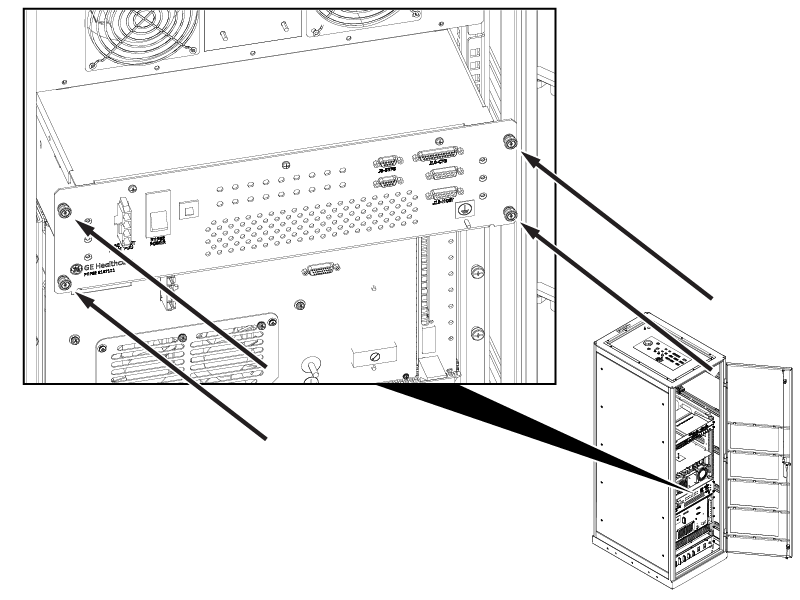
Loosen four captive fasteners.
Figure 1. Four captive fasteners
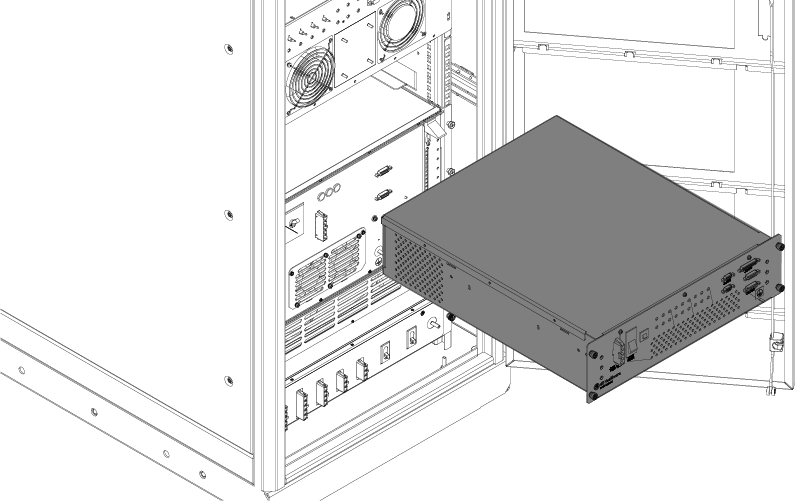
Slowly pull the PHPS 2 all the way out to the front.
Note: Use caution to not hook or damage the eight cables on service loops at the rear and the delicate fiber optic cable hanging under the shelf.
Disconnect the cables from the rear of the PHPS 2.
Disconnect the fiber optic cable from the rear of the fiber optic interface.
Note: Make sure the cables do not fall to the back, where it is difficult to retrieve them.
Remove the PHPS 2.
Figure 2. PHPS 2 removal
Remove the sub-D filters from connectors J35, J36, and J54. Retain the filters for installation on the replacement unit.