
- SIGNA™ Hero 3.0T Service Methods
- 5852800-8EN Revision 1.0
- 00000018WIA3064FE20GYZ
- id_131060813.0
- Aug 29, 2019 1:50:52 AM
ICC Power Phase Error
Phenomenon
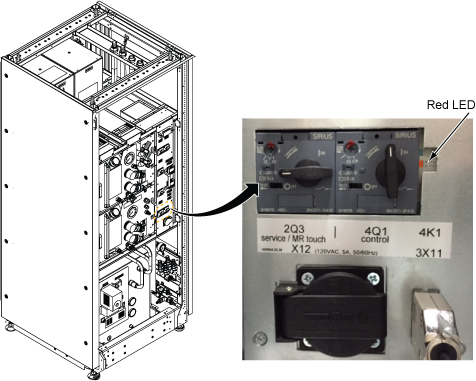
Red LED is lit at Control Box Main Breaker: It is caused bacause the ICC power cable phase is wrongly connected.
Troubleshooting
Check the phase of Power Cable connection one by one.
-
Perform LOTO for MDP(Main Disconnect Panel) or Facility PDU .
-
Check ICC Control Box (J1) connection.
Figure 2. ICC Power and Ground Cable Wiring 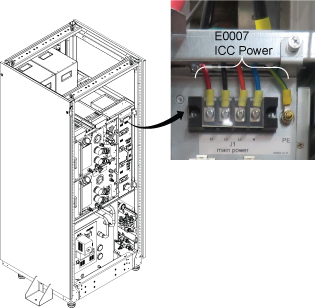
-
Check ISC Power Cable Connections
-
J101 ICC Power
-
J100 Main Power
Figure 3. ISC Power Cable Connections 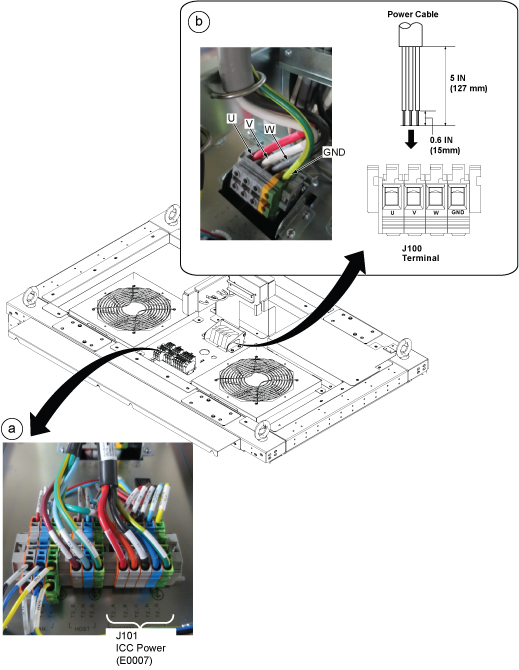
-
-
Check Power cable connection at MDP
-
Once wrong cable wiring is corrected, restore the power by removing LOTO.
-
Confirm that the Red LED does not lit anymore.