
- SIGNA™ Hero 3.0T Service Methods
- 5852800-8EN Revision 1.0
- 00000018WIA30D64E20GYZ
- id_131058383.1
- Apr 2, 2020 4:17:48 PM
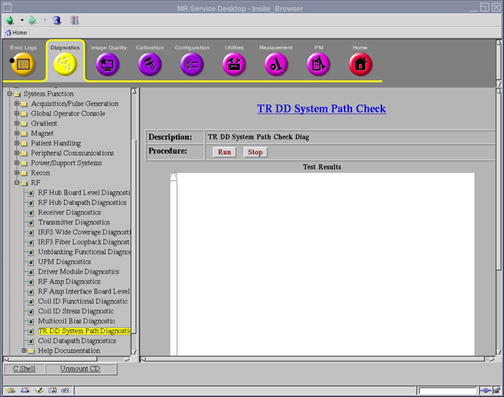
Doing a Transmit Receive (TR) Dynamic Disable and Direct Drive (DD) system path check
The Transmit Receive (TR) Dynamic Disable and Direct Drive (DD) system path check helps the field engineer in troubleshooting faults related to the T/R and DD system paths.
Diagnostic link
Purpose
The purpose of this diagnostic is to help the field engineer in troubleshooting faults related to the TR and DD system paths.
Components tested
T/R and DD system paths.
Requirements
- Make sure no scan is running before running the diagnostic.
- To test all failure modes, each type of transmit coil or switch that could be used in the system must be tested. This includes local transmit coils.
- Only one coil or transmit switch can be connected at a time. This means that the diagnostic must be executed multiple times on differing coil/switch populations to fully cover all failure scenarios.
- Insert service key.
Test sequence
- Disconnect all local transmit coils from Connector P2.
- Click Run to start the diagnostic.
Note: Click Stop to halt the diagnostic.
Block diagram
None
Expected results
The results are displayed in the test results window. The results are also logged under /usr/g/service/log/System_Path_Diag_Log.txt.
- If the diagnostic completes without errors, no further action is required for the baseline coil configuration. Proceed to test with any local transmit coil configurations available.
- If a failure occurs, review the diagnostic error message in the results window, as well as the system error log and extended error messages for subsequent actions. The error message will state the problem and what signal path is experiencing it.
- If a local transmit coil will be used with the system, connect it to Connector P2. Click Run to begin diagnostic again.
This diagnostic has the ability to detect the following faults:
| TR faults | DD faults |
|---|---|
| Head: Open & Short | Open |
| Body: Open & Short | Short |
| Head and Body Cables Swapped |