
- Discovery MR750 3.0T System Service Methods
- 5690009-2EN Revision 4
- 00000018WHA30B772GYZ
- id_20016259.1
- Jul 13, 2021 4:05:16 PM
Running LVShim in Auto mode
About this task
Procedure
- Select Gradient Shim and click Scan.
Figure 1. Gradient shim - auto mode 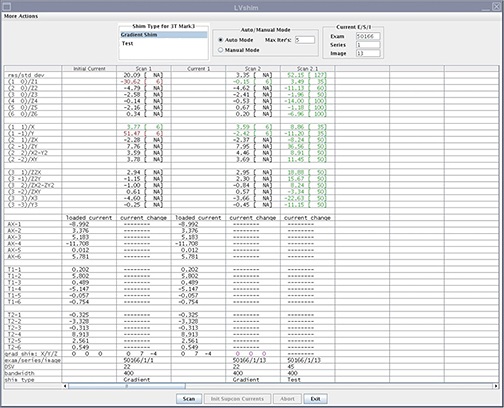 Note: (For gradshim software version 29.1 and later) The gradient shim bit resolution was increased by 16 times. This will result in gradient current values that are much higher than those observed in previous versions of this tool.
Result
In auto mode, the tool does the following:- Sets up the protocol and collects image data
- Calculates linear harmonics and compares it with the specification
- Calculates the delta currents and the new currents based on the harmonics (dc offsets for X, Y, and Z)
- Completes multiple iterations (maximum = five) until harmonics meets the specification
- Shows the reanalysis of the last iteration in the final column in test mode (customer acceptance specification)
Finalization
- To finalize this procedure, remove any phantoms and/or tools used.
- Perform a Check Scan before turning the unit over to the customer. See Doing a check scan.