
- Discovery MR750 3.0T System Service Methods
- 5690009-2EN Revision 4
- 00000018WIA3024D010GYZ
- id_20029634.6
- Feb 4, 2022 2:40:12 PM
Doing ICW GOC calibrations
This procedure details the global operator cabinet (GOC) calibrations of the Install and Calibration Wizard (ICW).
Prerequisites
| Personnel requirements | |||
|---|---|---|---|
| Required persons | Preliminary requirements | Procedure | Finalization |
| 2 | - | 3 hours | - |
| Required conditions |
|---|
| Get HIS/RIS and filming network information from customer administrator. |
| Safety |
|---|
|
Before working in any GE Healthcare MR suite or performing any GE Healthcare service procedure, you must:
If you have any safety concerns at any time, do not begin work or immediately stop work and move to a safe location. Immediately contact your supervisor or site safety officer for instructions on how to proceed. |
About this task
There are three tasks that must be completed and checked off:
- Intercom Adjustments
- Picture Archiving and Communication System-Hospital Information System/Radiology Information System (PACS-HIS/RIS) and networking
- Pneumatic Patient Alert Check
Procedure
- Check the pneumatic patient alert.
Figure 2. Audio alert box 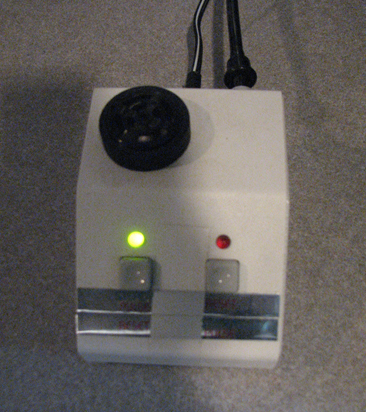
- Find the patient warning squeeze bulb (PWSB) near the magnet enclosure. The PWSB connects to the physiological acquisition controller (PAC) assembly.
- Find the audio alert box near the console.
- Compress the PWSB. The audio alert box produces an audible alarm.
- After you complete the previous sub-steps, select the box next to Is Pneumatic Patient Alert Check done?.