
- SIGNA MR355 / SIGNA MR360
- Service Manual
- 5856356-3EN Revision 5.0
- Basic Service Documentation. Copyright General Electric Company.
- 00000018WIA30D48F20GYZ
- id_131068632.0
- Jul 19, 2019 11:00:24 AM
Stopping and Starting TNS Function
Prerequisites
| Required persons | Preliminary requirements | Procedure | Finalization |
|---|---|---|---|
| 1 | Not Applicable | 5 minutes | Not Applicable |
About this task
See Stopping the TNS Function Via Software for procedure to stop the TNS Function and then Enabling the TNS Function Via Software for turning the TNS Function back on.
Stopping the TNS Function Via Software
Procedure
- On the Common Service Desktop go to the Utilities Tab and start TNS Software Control. See Figure 1.
Figure 1. Starting TNS Tools 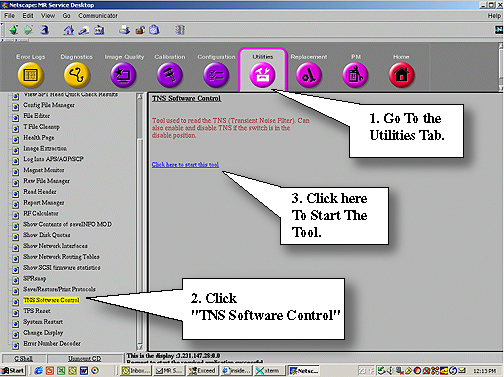
- Once the mgd_script page opens, at the command line type: mgd_tns -b m=1 0Enter to turn off
the TNS Function. See Figure 2.
Figure 2. Command Line to Stop TNS 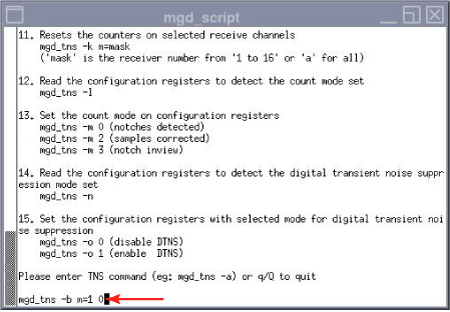
- You’ll see the Notching Write successful if the shut down was successful. See Figure 3
Figure 3. Notching Write Successful Statement 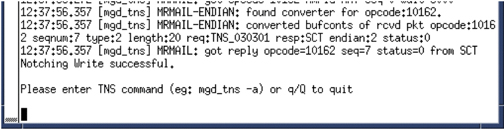
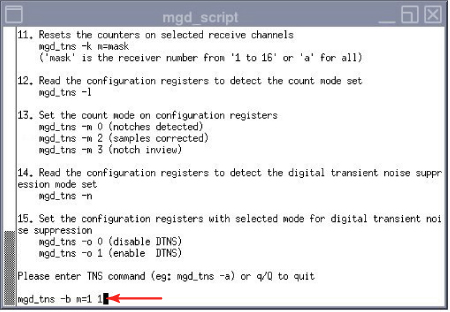
Enabling the TNS Function Via Software
Finalization
Finalization
No finalization steps.