
- SIGNA MR355 / SIGNA MR360
- Service Manual
- 5856356-3EN Revision 5.0
- Basic Service Documentation. Copyright General Electric Company.
- 00000018WIA3079AF20GYZ
- id_131068231.2
- Jul 5, 2019 11:18:59 PM
Skirt Cover Removal
Prerequisites
| Required persons | Preliminary requirements | Procedure | Finalization |
|---|---|---|---|
| 1 | Not Applicable | 1 minutes | Not Applicable |
| Item | Quantity | Effectivity | Part number | Manufacturer |
|---|---|---|---|---|
| Non Ferrous Standard Tool | 1 | - | - | - |
| ||||

About this task
| Last Update | 11/27/2006 |
Front Right and Left Skirt Covers
Procedure
- Slide and remove front right skirt cover to the magnet front side.Note:
The illustration is front right skirt cover. The front left skirt cover is similar to front right skirt cover.
Figure 1. Front Skirt Cover Removal 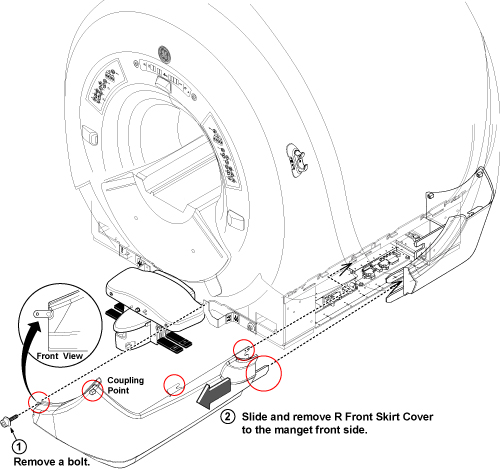
Rear Right and Left Skirt Cover
Procedure
- Slide and remove rear right skirt cover to the magnet rear side.Note:
The illustration is rear right skirt cover. The rear left skirt cover is similar to rear right skirt cover.
Figure 2. Rear Skirt Cover Removal 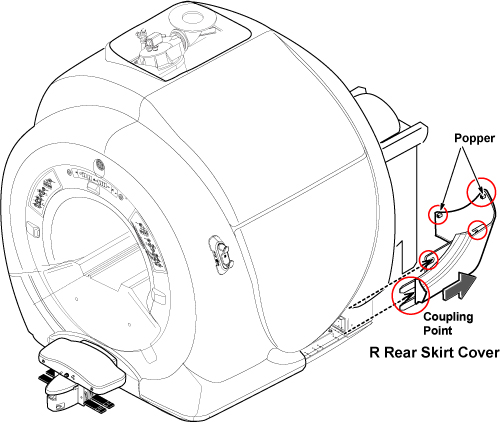
Finalization
Finalization
No finalization steps.