
- SIGNA MR355 / SIGNA MR360
- Service Manual
- 5856356-3EN Revision 5.0
- Basic Service Documentation. Copyright General Electric Company.
- 00000018WIA30E9BF20GYZ
- id_131068141.2
- Jul 6, 2019 12:17:32 AM
LPCA Cover Removal
Prerequisites
| Required persons | Preliminary requirements | Procedure | Finalization |
|---|---|---|---|
| 1 | Not Applicable | 5 minutes | Not Applicable |
| Item | Quantity | Effectivity | Part number | Manufacturer |
|---|---|---|---|---|
| Non Magnetic Tool Set | 1 | - | - | - |
| ||||||||

| Condition | Reference | Effectivity |
|---|---|---|
|
System Power must be turned OFF. | - | - |
About this task
| Last Update | 07/17/2009 |
Procedure
- Remove LPCA cover as illustration.
Figure 1. LPCA Cover 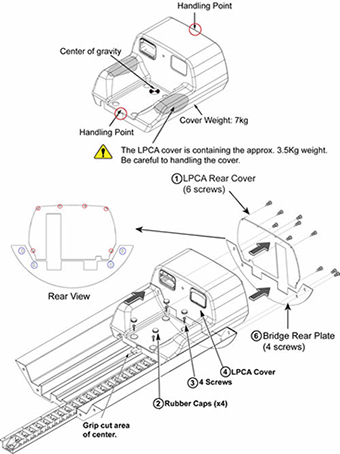
Finalization
Procedure
After replacement is done, restore power.