
- SIGNA MR355 / SIGNA MR360
- Service Manual
- 5856356-3EN Revision 5.0
- Basic Service Documentation. Copyright General Electric Company.
- 00000018WIA30042F20GYZ
- id_131075743.0
- Aug 29, 2019 1:54:54 AM
HD 8CH CTL Cable Replacement
Prerequisites
| Required persons | Preliminary requirements | Procedure | Finalization |
|---|---|---|---|
| 1 | 0 minutes | 30 minutes | 0 minutes |
| Item | Quantity | Effectivity | Part number | Manufacturer |
|---|---|---|---|---|
| Screw Driver Set | 1 | - | - | - |
| Item | Quantity | Effectivity | Part number | Manufacturer |
|---|---|---|---|---|
| 2417163: FRU Cable, GE Signa HD 1.5T 8CH CTL | 1 | - | - | - |
About this task
Follow this process to replace the cable assembly on the 1.5T Signa HD 8CH CTL Coil by GE/USAI (M3335MA).
| Last Update | 01/05/2006 |
Procedure
- Lay the CTL coil on its side and remove the 19 screws holding the base
cover on the unit as shown below: Figure 1.
Don’t remove the center up screw as shown in the illustration below
Figure 1. CTL Coil Screw Removal Position 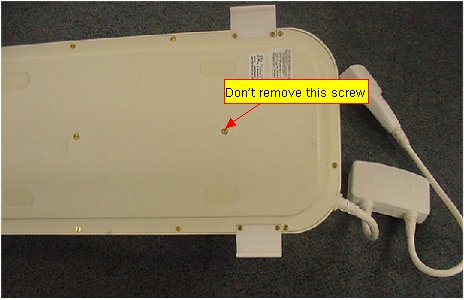
- Disconnect the RF cables and the DC wires from the multiplexer board,
as shown below:
Figure 2. RF cables and the DC wires 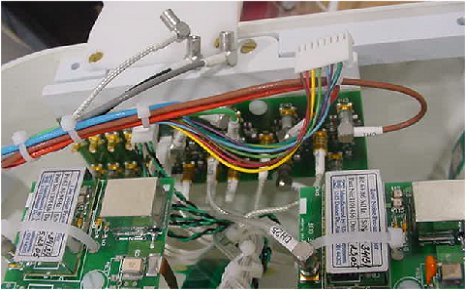
- Remove two screws on the clamp of strain relief as shown below:
Figure 3. Two screws on the clamp 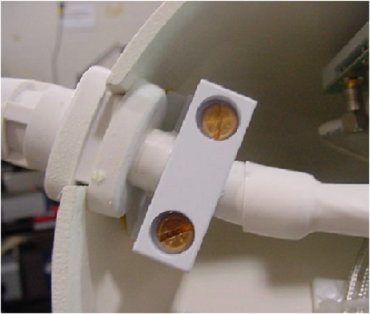
Finalization
No finalization steps.