
- SIGNA MR355 / SIGNA MR360
- Service Manual
- 5856356-3EN Revision 5.0
- Basic Service Documentation. Copyright General Electric Company.
- 00000018WIA303E6E20GYZ
- id_131069593.0
- Aug 29, 2019 1:36:00 AM
First Image
Prerequisites
| Required persons | Preliminary requirements | Procedure | Finalization |
|---|---|---|---|
| 1 | Not Applicable | 15 minutes | Not Applicable |
| Item | Quantity | Effectivity | Part number | Manufacturer |
|---|---|---|---|---|
| DQA Phantom | 1 | - |
2131027-2 | - |
| ||||||||

| Condition | Reference | Effectivity |
|---|---|---|
|
Signa software fully operational | - | - |
|
Magnet mechanically shimmed | - | - |
About this task
Procedure for obtaining the first image after the system installation.
| Last Update | 09/28/2004 |
Procedure
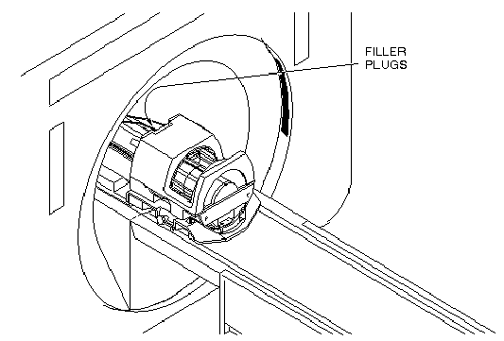
- Place the DQA phantom in the head coil. Positioning the fill plugs up
and toward the rear of the magnet. See Figure 1.
Figure 1. DQA PHANTOM POSITIONING 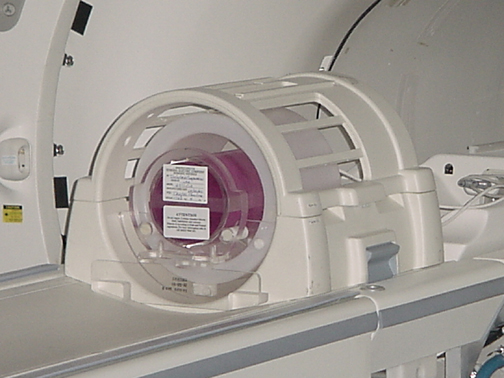
- DISPLAY IMAGE
Verify that the images on the monitor correspond with Figure 2. Do not be concerned with image quality at this time; it will be addressed during the Performance Checks.
Figure 2. DQA PHANTOM GEOMETRY FOR "FIRST IMAGE" 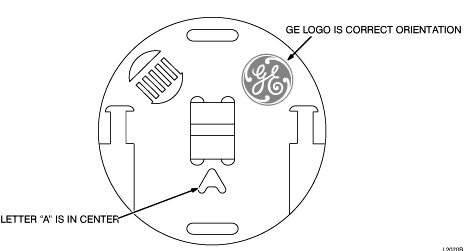
Finalization
No finalization steps.