
- SIGNA MR355 / SIGNA MR360
- Service Manual
- 5856356-3EN Revision 5.0
- Basic Service Documentation. Copyright General Electric Company.
- 00000018WIA30328F20GYZ
- id_131069232.0
- Jul 19, 2019 11:00:05 AM
DC Offset Adjustment
Prerequisites
| Required persons | Preliminary requirements | Procedure | Finalization |
|---|---|---|---|
| 1 | Not Applicable | 5 minutes | Not Applicable |
| Condition | Reference | Effectivity |
|---|---|---|
|
No scan in progress. Hit End Exam to end any exam in progress. | - | - |
Procedure
- Go to the Service Desktop and select Calibrations from the Service Browser. See Figure 1.
Select DC Offset Calibration.
Figure 1. Selecting DC Offset Calibration in the Service Browser 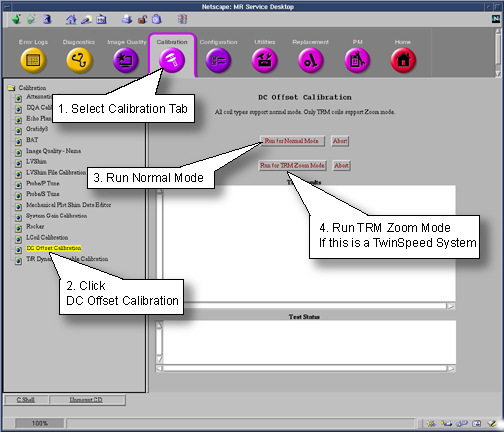
Finalization
No finalization steps.