
- SIGNA MR355 / SIGNA MR360
- Service Manual
- 5856356-3EN Revision 5.0
- Basic Service Documentation. Copyright General Electric Company.
- 00000018WIA30007E20GYZ
- id_131068323.0
- Aug 29, 2019 1:36:10 AM
DC Offset Adjustment
Prerequisites
| Required persons | Preliminary requirements | Procedure | Finalization |
|---|---|---|---|
| 1 | Not Applicable | 5 minutes | Not Applicable |
| Condition | Reference | Effectivity |
|---|---|---|
|
No scan in progress. Hit End Exam to end any exam in progress. | - | - |
About this task
DC Offsets will need to be run during the initial system calibration, at the time of system upgrade (i.e. EXCITE 2 to EXCITE 3) or if the GP or SGA has been replaced.
Procedure
- Go to the Service Desktop and select Calibrations from the Service Browser. See Figure 1.
Figure 1. Selecting DC Offset Calibration in the Service Browser 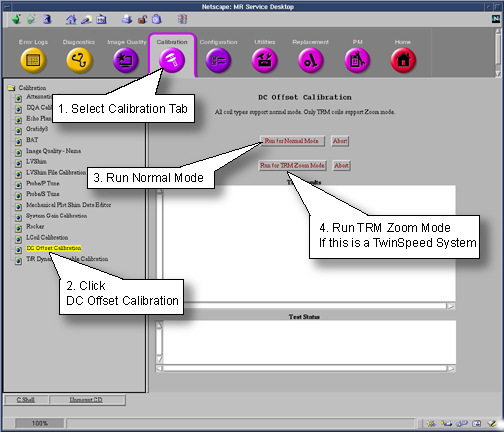
Finalization
No finalization steps.