
- SIGNA MR355 / SIGNA MR360
- Service Manual
- 5856356-3EN Revision 5.0
- Basic Service Documentation. Copyright General Electric Company.
- 00000018WIA303A6240GYZ
- id_20131296.1
- Mar 8, 2021 2:25:16 AM
Changing Boot mode
Change the Boot mode from Legacy to UEFI when reloading the USB host system software.
Procedure
Visually inspect the top of the Preparing One-Time Boot or Please select boot device menu.
- (For Dell T5810) Locate the phrase Boot mode is set to:.
- If the Boot mode is set to Legacy, use the up and down arrows on the keyboard to select BIOS Setup, listed under OTHER OPTIONS.
Figure 1. Boot mode 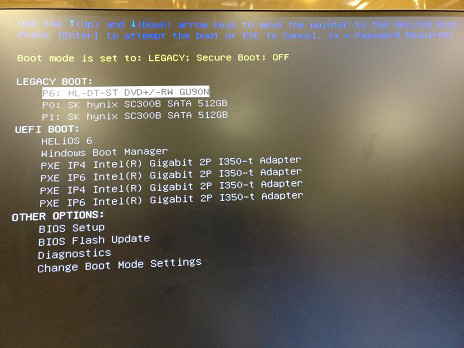
- Press Enter.
- Under Settings in the left side of the window, select .
- Under Boot List Option in the right side of the window, select UEFI.
Figure 2. Boot list option 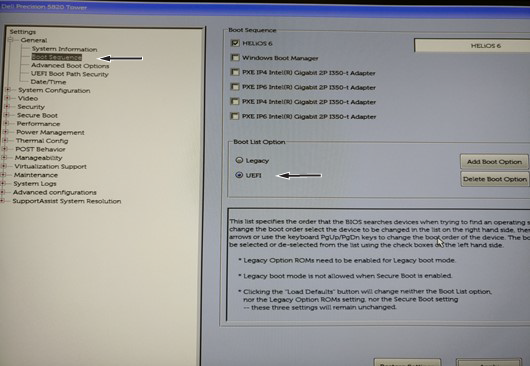
- Click Apply and then Exit.
- If the Boot mode is set to Legacy, use the up and down arrows on the keyboard to select BIOS Setup, listed under OTHER OPTIONS.