
- SIGNA MR355 / SIGNA MR360
- Service Manual
- 5856356-3EN Revision 5.0
- Basic Service Documentation. Copyright General Electric Company.
- 00000018WIA30DB1F20GYZ
- id_131070371.1
- Jul 6, 2019 12:17:31 AM
1.5T GP Flex Coil SNR Test
Prerequisites
| Required persons | Preliminary requirements | Procedure | Finalization |
|---|---|---|---|
| 1 | 0 minutes | 15 minutes | 0 minutes |
| Item | Quantity | Effectivity | Part number | Manufacturer |
|---|---|---|---|---|
| Head TLT Sphere | 1 | - |
46-265826G6 | - |
| Head Loader | 1 | - |
46-287899G1 | - |
| Condition | Reference | Effectivity |
|---|---|---|
|
The following coil configuration names must be installed to run this tool: Check the system coil configuration for GP Flex coil configuration. If GP flex has not been installed, select GP flex from the list of available coils, and install. | - | - |
About this task
Follow this process to prepare for the SNR test using the GP Flex coil.
-
GE catalog Part number :M1085GF
Procedure
- The Quad Head Coil must be completely removed from the cradle before performing any body or surface coil scans. Failure to do this may result in damage to the Quad Head Coil T/R network.
- Set the phantom and GP Flex coil on the cradle as following
steps.
- Align center of the mesh window and center of the cradle.Note:
Place the GP Flex coil far enough from LPCA so that the coil cable won't be placed under the coil to avoid the low SNR.
Figure 1. setup1 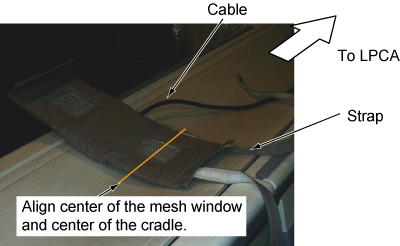
- Place the phantom with holder on S-I center of the GP Flex.
Figure 2. setup2 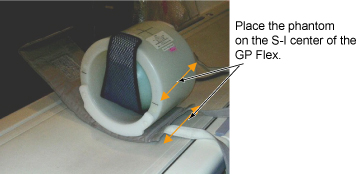
- Wind the other side of the GP Flex Coil around the phantom holder
and fix by the velcro tape on the strap.
Figure 3. setup3 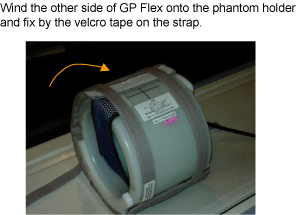
- Verify that the coil cable is not placed under the coil.
Figure 4. setup4 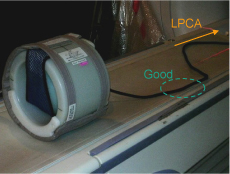
- At the magnet, press “Alignment Light” button to
turn on the light. Move the cradle to align the coil to the alignment
lights. Press “Landmark” button to landmark the alignment.
Figure 5. setup5 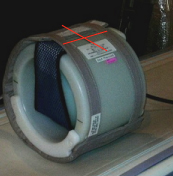
- Align center of the mesh window and center of the cradle.
- Move the coil to scan position by pushing the “Move to Scan” button, ensuring cable does not get snagged.
- Perform MCQA Tool. Refer to Multi-Coil Quality Assurance Tool.
Finalization
No finalization steps.