Basic Service Documentation. Copyright General Electric Company.
Object ID: 00000018WIA309ADF20GYZ
Topic ID: id_13106039 Version: 3.0
Date: Aug 29, 2019 1:55:35 AM
1.5T Express Coil: 16E Head Neck Array Coil Cable Replacement
Prerequisites
Table 1. Personnel requirements
Required persons
Preliminary requirements
Procedure
Finalization
1
0 minutes
40 minutes
0 minutes
Table 2. Tools and test equipment
Item
Quantity
Effectivity
Part number
Manufacturer
Standard tool kit
- Flathead screwdriver, 10 in-lbs torque driver, 15in-lbs torque driver,
Spanner and pliers
1
-
-
-
Table 3. Safety
Notice
Observe Anti-Static Precautions.
About this task
Follow this process to change the system cable for coils that
have a cable available as a spare part.
Procedure
Notice
Wear the static electricity prevention wrist band when accessing the cables below cradle not to damage the electronics module.
Unscrew the bottom cover and remove from coil. Retain
the original screws used.
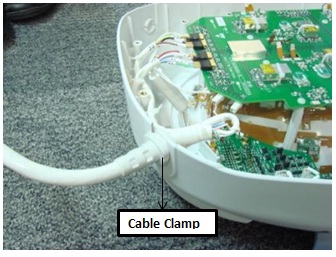
Unscrew the cable clamp nut from the coil as shown in Figure 1.
Figure 1. Removing the Cable Clamp
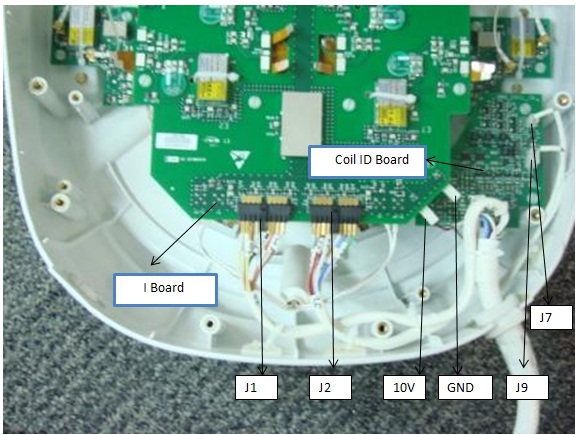
Identify the I board Assembly and the Coil ID PCB on the
Head Neck Unit HNU Only. See Figure 2.
Figure 2. Mux Board and Coil ID PCB Locations
Identify the RF GANGED Connectors (J1, J2) and DC Connectors
Pins (10V and Gnd on I Board and J7, J9 on Coil ID Board). See Figure 2.
Remove all RF connectors (J1, J2) from I Board. See Figure 2.
Remove DC connectors: 10V and GND from I Board and J7, J9 from
Coil ID PCB. See Figure 2.
Remove the system cable (without the coil id).
Install the new system cable.
Align the cable into the notch of former slot.
Connect RF connectors (J1 and J2) to Mux Board. Verify that
all labels on the connectors match those on the I Board. See Figure 2.
Connect DC connectors (10V & GND) to I Board and J7 and
J9 to coil ID PCB. Verify that all labels on the connectors match
those on the Mux Board and Coil ID Board. See Illustration 2.
Replace cover. Use original screws to fasten cover.