- SIGNA MR355 / SIGNA MR360
- Service Manual
- 5856356-3EN Revision 5.0
- Basic Service Documentation. Copyright General Electric Company.
- 00000018WIA30F27640GYZ
- id_20144974.0
- Feb 21, 2021 9:06:12 PM
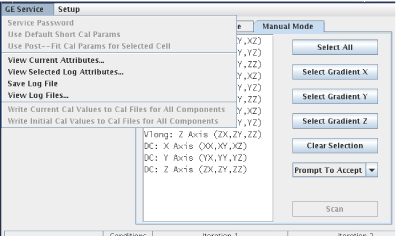
Grafidy - GE services pull-down list
Service password
If the service key is not present, many of the options listed below will be unavailable. If the key is not available and you are a GEHC Service Personnel, you can activate all options by selecting Service Password and entering the Service Password.
View log files
When a calibration session is completed and the Exit button is selected, the session is saved to a log file. A file is created for each Grafidy 3 session. These log files may be viewed by selecting from the top menu bar GE Service > View Log Files.
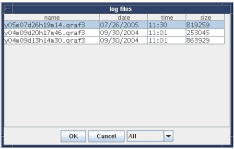
When selected, a list of log files displays. All log files may be displayed, depending on the scans completed. With the list displayed, click the desired log file and select OK. The data is loaded and the display appears as if the calibration session was just completed.
(For where can this selection be found?)
Write current cal values to cal files for all components
If selected, the current (last “accepted”) calibration parameter values are saved to the calibration files for all components. This menu item is useful when the calibration files are lost. Simply load the log file from the last calibration session and select this option.
Write initial cal values to cal files for all components
If selected, the calibration parameter values that were in the calibration files when the current Grafidy 3 session was started are reloaded. This applies to all components.
Save log file
If selected, the current state of the Grafidy 3 session is written to a log file. This file is independent of the file automatically generated when the tool is exited. This function does not have to be used unless there is a high risk of software instabilities or power failure (it allows you to start where you left off by loading in the file).
View current attributes
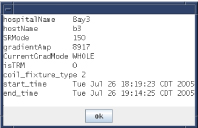
If selected, a message displays the information related to the system currently being used. This information includes the hospital name, gradient slew rate, gradient driver, gradient mode (whole/zoom), and start time (when Grafidy 3 was invoked).
View selected log attributes
If selected, a message displays the information related to the system on which the log file was generated. This feature is useful if the log file was copied to another system to be viewed. If on a different system than the one used to collect the data, only viewing is allowed (downloading calibration parameter values and continued scanning is not allowed).