- SIGNA MR355 / SIGNA MR360
- Service Manual
- 5856356-3EN Revision 5.0
- Basic Service Documentation. Copyright General Electric Company.
- 00000018WIA30C62F20GYZ
- id_131070693.0
- Aug 29, 2019 1:54:57 AM
Phantom Setup for 3 inch and 5 Inch Coil SNR Check
Single Coil QA Setup
-
When scanning phantoms with coils, always remove the Head Coil or any other coil from the patient table.
-
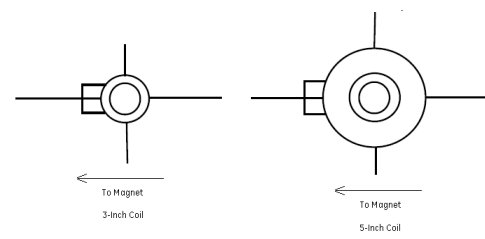
Position each coil with the cable-end of the coil facing the magnet bore.
-
Place the Circular Coil on the patient table.
-
Landmark the center of the coil. This correlates to the center of the phantom.
-
Press [Advance To Scan].
-
Proceed with scan protocol section 3.2.3 in Service Manual 5263552TPH, selecting the appropriate surface coil.
Figure 1. Phantom Setup