- id_2012135
- Version: 4.1
- Date: Sep 29, 2019 11:24:07 PM
Doing the leak sensor functionality test
Procedure
- Shut down the system by clicking the arrow on the Tools High Level Access tab, select System Shutdown, and click [Yes] to confirm the shut down.
- Place all circuit breakers in the OFF (down) position.
-
Figure 1. Circuit breakers on PDU
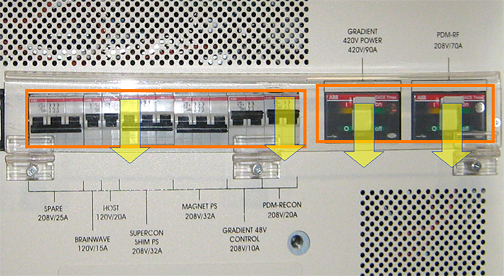
- Power on the Gradient 48V switch in the PDU. Verify that all other circuit breakers are OFF.note: If the PDU main breaker trips when you power on the gradient 48V switch, it indicates that the leak sensors are in contact with leaked coolant.
For details, see Leak detection sensor theory and troubleshooting
- Verify that the AUX board (or PEM) power is ON.
- Put a small drop of water on the leak sensor strip.
Figure 2. Leak sensor strip location
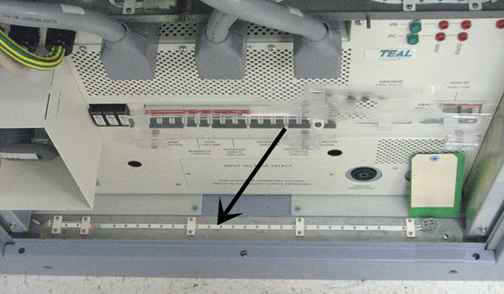
- The PDU main circuit breaker should trip (power down) within two minutes of putting the drop of water on the leak strip. This verifies that the leak sensor is functioning properly.
If it is not functioning properly, refer toLeak detection sensor theory and troubleshooting.
- Dry off the leak sensor and surrounding sheet metal.
- Before powering on the PDU, verify that the leak sensor strip is clean and dry.