To generate new licenses, you must have order number(s) that list the options ordered, as well as the host ID and system ID of the system.
About this task
Follow these steps to obtain a system host ID.
Procedure
Select the Service Tools Desktop.
From the Service Desktop Manager, select Guided Install and select Start… to open Guided Install.
When a command window displays the message Type Root Password, type the system's root password, and press Enter.
Note: It is possible that the customer changed the default password. If you cannot log in, contact the customer for the correct password.
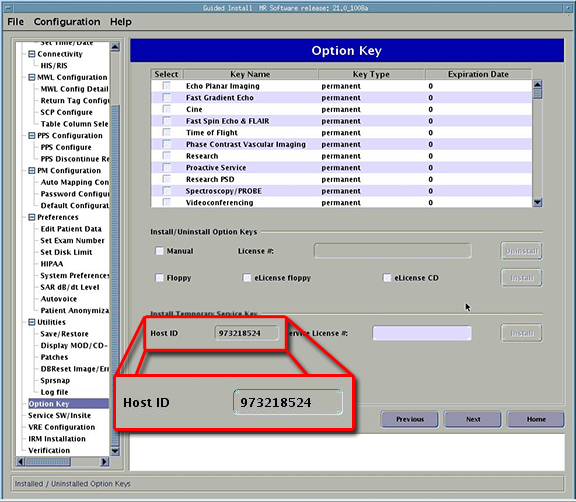
After the Guided Install window opens, select the Option Keys tab. The Host ID is in the Install Temporary Service Key section shown below.
Note: The screen shown below is an example; the interface may differ on other systems.
Figure 1. Guided install option key host ID
Another method of obtaining the Host ID is to type sysinfo at a command prompt.
Note:hostid is not a valid command to obtain the Host ID. This causes an error when trying to generate keys, due to the incorrect Host ID. The methods listed above must be used to get a valid ID.