- Topic ID: id_23554141
- Version: 4.0
- Date: Dec 22, 2021 11:23:47 PM
PM Schedule B Procedures
1 Schedule B Overview
Complete Schedule B one third of every year. This schedule includes a general cleaning and inspection of the Gantry, Console, and NGPDU. The tools, test equipment, and consumables listed here are needed to complete Schedule B.
Every site must maintain a site log. It can be a GE Site Log, or a notebook or binder that you create. A System Service History also is available through iCenter or ISD tools.
When reviewing the error logs, or during the course of the PM, if you find anything that you determine is critical to quality or to the operation of the system, then you should record it on the PM Report Form, and schedule additional time for specific corrective action.
You will need to open the PM Report e-form that corresponds to this PM Schedule. (The e-form is located on SIMS Content Viewer) Fill in the Report form as you complete the PM Schedule. Print one copy for your Site Log. You may need to print a second copy for the customer, if requested.
2 Personnel and Time Requirements
3 Tools and Test Equipment
4 Consumables
5 Preliminary Requirements
You may do any of the following remotely, if possible.
-
Before beginning this PM Schedule, verify that the last PM Schedule completed was Schedule A.
-
Determine if any PM tasks were completed earlier as part of a service action.
6 Initial Procedures
6.1 Check Temperature and Humidity
Check the Temperature and Humidity in the scan room; record these on the Report Form. (Use the temperature and humidity tool [Oregon Scientific BAR608HGA], or an equivalent tool.)
6.2 Gantry
-
Remove the gantry right side cover. (For procedures see
-
Complete the General Gantry Inspection, including the following: (For procedures, see General Gantry Inspection.)
-
Test Display Lights and E-stop Buttons
-
Test Patient Tilt Sensors
note:Ignore inspection of the Listen for Unusual Noises.
-
-
Complete a Laser Alignment Inspection. (For procedures, see Laser Alignment Inspection.)
-
If your site has any of the following options, complete an inspection of each. (For procedure, see Option Inspection.)
- Ceiling Mounted Component Bolts
- Nemoto Injector Inspection
- Cardiac Option Inspection
-
Complete a Collimator Inspection (For procedures, see Collimator Inspection.)
6.3 Phantom Inspection
Verify there is no crack or damage on QA phantom.
7 Power Off, Gantry Covers Off
-
Move the table to lowest position.
-
Move the gantry to zero degrees by pressing the Tilt Forward and Tilt Back buttons simultaneously.
-
Do a Gantry Tilt Zero Check using the System Troubleshooting Tool. (For procedures, see Gantry Tilt Zero Check.) Record the results on the PM Report Form.
-
Power down the system (for procedures, see Section 2.1 of Safety-Equipment Service-Lockout-Tagout-PPE), and apply LOTO (for procedures, see Safety-Equipment Service-Lockout-Tagout-PPE).
note:If your system has an Emergency OFF switch on the wall, use it rather than the A1 Off switch to verify that the Emergency Off switch is working properly.
-
If installed, confirm that the UPS power is disconnected when the Emergency Off device is pushed.
-
Remove the gantry left side, top, front, rear, and back left base covers. (For procedures see,
7.1 Console
Complete the General Console Cleaning and Inspection. (For procedures, see General Console Cleaning and Inspection.)
7.2 Gantry
-
Inspect the Brush Block, Brushes, and Remove Slip Ring Brush Debris. (For procedures, see Inspect Brush Block and Brushes and Remove Slip Ring Debris.)
-
Complete an Axial Belt Tension Inspection.
-
Complete the Gantry Filter Cleaning and Rotational Checks, including the following: (For procedure, see Gantry Filter Cleaning and Rotational Checks)
-
Clean DAS Detector Plenum Filter and Duct Cover
-
Clean DAS DIFB Fan Filters (only for PDAS)
-
Clean top cover fans
-
Clean Detector Face Plate
-
Complete Rotating Path Components and Cables Inspection
(For GDAS, see ) CTPM-1322 (Clean DAS, DUCT Fan Filters)
(For PDAS, see ) Clean Pancake DAS Fan Filters
-
-
Complete the Encoder Inspection. (For procedures, see Gantry Encoder Inspection.)
-
Inspect the Hydraulic Tilt Pump for leaks:
-
Inspect the gantry hydraulic tilt cylinder (left and right side), and fittings for leaks.
-
Remove the gantry base cover.
-
Inspect the gantry hydraulic tilt pump and reservoir for leaks.
-
Note the following model and serial numbers for use in the GIB during finalization:
-
Tube Housing
-
Tube Insert
-
Collimator
-
Detector
-
Gantry
-
-
7.3 NGPDU
Complete the NGPDU Inspection. (For procedures, see NGPDU Checks)
Ignore inspection of the verification of tap connection.
8 Power On, Gantry Covers Off
-
Remove LOTO (for procedures, see Safety-Equipment Service-Lockout-Tagout-PPE), and power up the system (for procedures, see Section 2.2 of Safety-Equipment Service-Lockout-Tagout-PPE).
-
Start up the UPS, if present.
-
Complete a Tube Heat Exchanger Inspection, including inspecting/cleaning the JEDI Inverter Fan. (For procedures, see Clean Tube Heat Exchanger and Heat Exchanger Pump Inspection.)
-
Complete a Gantry Thermistor Inspection. (For procedures, see Gantry Thermistor Inspection.)
-
Check that all of the Plenum Fans are operating properly. Use a piece of paper to make sure the fans are pulling air INTO the plenum.
note:A fan that is not running can still have the fan blades moving as air is pushed back out of the plenum though that fan port.
-
Check/Grease the gantry main bearing.
-
Check the number of gantry revolutions since the gantry bearing was last greased.
-
If the number of revolutions is 2,000,000 or more, grease the gantry main bearing. (For procedures, see Grease Main Bearing.)
-
If the number of revolutions is less than 2,000,000, indicate on the PM Report Form that grease is not required at this time.
-
9 Power Off, Gantry Covers On
-
Turn the 120 VAC power off at the gantry service switch panel. (For procedures, see Safety-Equipment Service-Gantry)
-
Reinstall front, rear, and top covers to the gantry. (For procedures see,
note:Do not replace the gantry side covers at this time.
-
If the Tilt Speed (recorded earlier) was within specification, reinstall the gantry base cover. (For procedures, see If the Tilt Speed was not within specification, do a Tilt Speed Adjustment. (For procedures, see Hydraulic Tilt Motor Speed Adjustment or Hydraulic Tilt Motor Speed Adjustment.)
10 Power On, Gantry Covers On
-
Turn the 120 VAC power on at the gantry service switch panel. (For procedures, see Safety-Equipment Service-Gantry)v
-
Rotate the gantry by hand and inspect rotational clearances.
-
Install and inspect the Scan Window. (For installation procedures, see Replacement-Gantry Enclosure-Gantry Scan Window Removal and Re-Install.)
-
Inspect the scan window for physical damage.
-
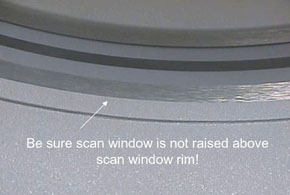
Check that the scan window is not raised higher than the front or rear cover at any location on the circle, and that the window is not wrinkled (see Figure 1).
Figure 1. Scan Window
-
Replace the scan window if it is damaged. (If you need to replace the scan window, follow the procedures in Replacement-Gantry Enclosure-Gantry Scan Window Removal and Re-Install to remove the old window and install a new one.)
-
-
Turn on the Axial Enable and HVDC switches at the gantry service switch panel. (For procedures, see Safety-Equipment Service-Gantry)
-
Install the gantry side covers. (For installation procedures, see
11 Finalization
-
Complete the System Scanning Test. (For procedures, see System Scanning Test.) While completing the test, do the following verifications and record them on the PM Report Form:
-
Verify that the following X-ray On indicators light up:
-
SCIM /GSCB
-
Gantry Front
-
Gantry Rear (To avoid walking into the room during a scan, you may want to use a mirror to check this X-ray indicator.)
-
Room Warning Light
-
-
Verify that the following scan control push-button are operational:
-
Start scan (and keypad lights).
-
Stop scan (and keypad lights).
-
Pause scan.
-
Advance to scan.
-
Stop table.
-
-
-
Update the site logs. (For procedures, see Update Site Logs.)
-
Complete all required PM paperwork.