- Discovery MR750w and SIGNA™ Architect T 3.0T System Service Methods
- 5690002-2EN Revision 4
- 00000018WIA30062F30GYZ
- id_20129732.2
- Apr 23, 2020 8:36:12 PM
Coil prescription overview
Radio Frequency (RF) coils are composed of elements that can be used to receive a Magnetic Resonance (MR) signal. A "Coil Configuration" or "Coil Mode" is a set of one or more elements from one or more RF coils used together to receive an MR signal. Previously, each of these coil configurations were predefined as part of product development. These predefined coil configurations will be referred to as "static coil configurations". Each of these static coil configurations is presented to the user. The most appropriate coil mode is then selected by the user for the scan.
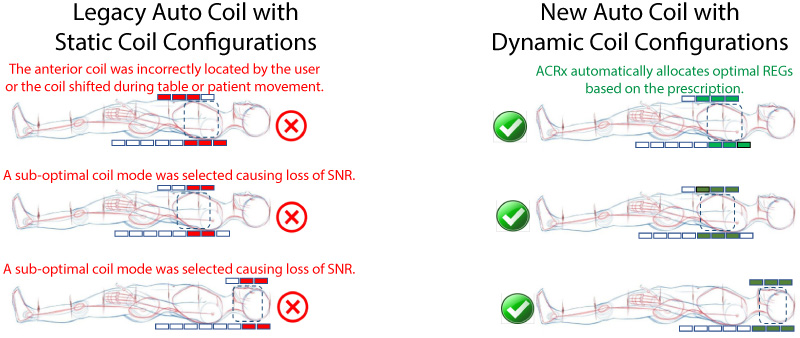
During the introduction of the MR450w GEM system, an Auto Coil Prescription (ACRx) feature was added to assist the user by selecting the static coil configuration that best matches the user's prescribed volume. This ACRx was only available for a subset of coils and continued to require predefining each of the sets of elements available to the user. For coils that can move to different locations on the table, the user specified the location of the coil using the Touch-and-Go strip. This feature will be referred to as "Legacy ACRx".
With the density and flexibility of the Adaptive Image Receive (AIR) hardware technologies, the way that coils are managed in the software has been transformed as well. Coil modes are no longer predefined using all of the combinations of elements; coil configurations are now created on-the-fly as "dynamic coil configurations". The current ACRx software optimizes which elements are used in the dynamic coil configurations to give the best set of elements for each scan.
Auto coil prescription improvements
- The user no longer needs to indicate the location of the anterior coil using the Touch-and-Go strip during landmarks. The coil location is determined automatically during prescan.
- The optimal set of elements is automatically selected using prescan data. There is no user intervention.
- Sensible user names and icons have replaced too many confusing coil modes in the user presentation.
- Elements are automatically selected to optimize image uniformity, Signal-to-Noise-Ratio (SNR), and parallel imaging capabilities while minimizing artifacts such as annefact.
- ACRx is available on all coils.
Differences between static and dynamic coil configurations
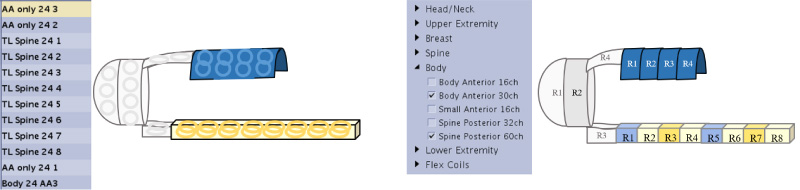
- Coil elements are organized into groups called Receive Element Groups (REG)s instead of hundreds of clinical coil modes created by manually defined combinations of coil elements.
- The REGs are used to dynamically build coil configurations with all of the necessary hardware setup information being computed automatically instead of hardware biasing and receive information being defined by hand.
- REGs from multiple coils can be combined.
- The size and location of each of the coil modes does not need to be measured and defined by hand.