- SIGNA™ Hero 3.0T Service Methods
- 5852800-8EN Revision 1.0
- 00000018WIA308E0110GYZ
- id_20033308.3
- Dec 14, 2021 4:20:11 PM
Loading proprietary software
This procedure explains how to install proprietary and advanced service software.
Prerequisites
| Consumables | |||
|---|---|---|---|
| Item | Quantity | Part number | Manufacturer |
| MR Service Software DVD | 1 | - | - |
| USB Software Media | 1 | - | - |
About this task
(For Software versions 27 and earlier) The MR Service Software DVD is shipped together with the MR Application Software Collector. The MR Service Software DVD combines the restricted software and the advanced software into a single DVD and can be used to install either the restricted software or the advanced software, based on SSA licensing.
(For Software versions 28 and later) The MR Service Software is part of the USB software media that contains all other software needed to be installed on the MR system.
Shut down all applications before loading the MR Service Software media. This media should not be loaded with applications software running.
Procedure
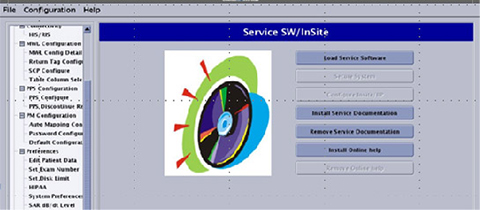
- Insert the MR Service Software media and from the left navigation menu, select Service SW/InSite and click on the Load Service Software button.
Figure 1. Service SW/InSite menu