Invisible laser radiation can be emitted from disconnected
fiber-optic cables or connectors.
Do not stare into the beam, point the cable or connector
ends at your eyes, or view through optical instruments.
CAUTION
Strong Magnetic Field!
The receiver has no ferrous material and will not be attracted
to the magnet, but eddy currents setup by the strong magnetic field
interacting with the RRx Receiver can make it very hard for one person
to handle.
When removing and or replacing the RRx Receiver on the
side of the magnet, ensure the receiver is as far away from the magnet
as possible while moving it.
Notice
Electrostatic discharge (ESD) can cause permanent damage to electronic components. Observe the following ESD precautions:
Wear a static wrist strap to ensure that any accumulated electrostatic charge is discharged from your body to the ground.
Create a common ground for the equipment being worked on by connecting the static-free mat, static wrist strap, and peripheral units to that piece of equipment.
Notice
The SFP optical transceiver is very sensitive to ESD. SFP latent failures can occur, in dry climates or low relative humidity, surpassing their ESD protection.
Contaminant failures can occur in SFP optics and exposed glass Rx and Tx cable ends. Do not touch the exposed ends on fiber connectors. Leave the dust caps in place until you are ready to install the SFP module. Use the Fiber Optics Cleaning Kit to clean both the SFP and cable end every time they are replaced or swapped from one port to another, or when using a loopback.
For more information on handling and cleaning the SFP transceiver refer to Fiber Optic Cable Devices Installation and Replacement.
CAUTION
When working with the SFP optical transceiver or SFP Loopback, also observe the following precautions:
Always use ESD protection when handling the SFP optical transceiver to prevent early failure.
Always keep a protective cap on unplugged fiber connections.
The SFP must be shipped in antistatic packaging. Discard any SFP shipped or stored without proper ESD protection.
Topic ID: id_SL2028352-1062884
Removing the RRx Receiver
Procedure
Power down the Scan Room Power Supply (SRPS) in the Penetration
Cabinet.
Remove the magnet side cover to access the RRx Receiver.
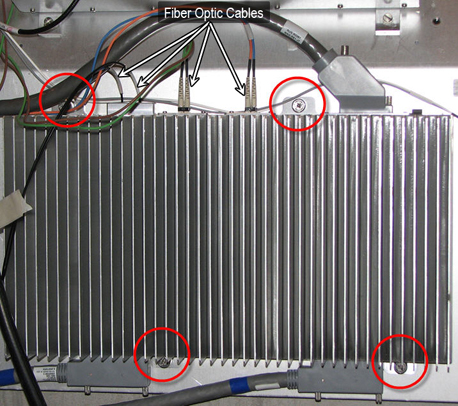
Remove the fiber optic cables from the RRx Receiver.
Note:
Handle the Fibre Optic cables with care, they are very fragile.
Remove the four (4) screws securing the RRx Receiver to the
magnet. See Figure 1.
Figure 1. RRx Receiver
CAUTION
Strong Magnetic Field!
The receiver has no ferrous material and will not be attracted
to the magnet, but eddy currents setup by the strong magnetic field
interacting with the RRx Receiver can make it very hard for one person
to handle.
When removing and or replacing the RRx Receiver on the
side of the magnet, keeping the receiver as far away from the magnet
as possible while moving it.
While carrying the receiver out of the magnet room, make sure
to stay as far away from the magnet as possible.
Topic ID: id_SL2028358-1062884
Re-installing the RRx Receiver
Procedure
While carrying the new receiver into the magnet room, make sure
to stay as far away from the magnet as possible.
Mount the RRx Receiver to the side of the magnet.
Tighten the four (4) screws to secure it to the magnet. See Figure 1.