Find which Service Pack is installed on the system before attempting to load any Service Pack update.
Procedure
Get the latest version of the MR Software Release Matrix, DOC1667089, from the online documentation library.
Open a command window, type getver, and click Enter.
Note: The Shell window can only be launched when the EA3 user is included in the authorized EA3 group. Users not in this EA3 group will not have access to launch the Shell window. If you are not logged on as the proper logon user, log out and then log back on as the correct EA3 user with the authorized permissions.
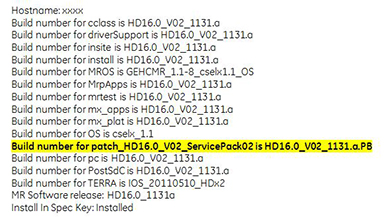
The loaded Service Pack information is in bold typeface in the results list.
Example
In this example, (for system HD16.0_V02), Service Pack 02 is loaded.Figure 1. Installing Service Packs
Compare the Service Pack version that is on the system with the MR Software Release Matrix.
If the proper Service Pack has been loaded, get the GE Equipment Maintenance Sticker (part number 5661793),
write the date and Service Pack number on the sticker, and place the sticker on the GOC for future reference.
If the latest Service Pack is not loaded, invoke Guided Install as root and load the latest software updates as described in the following tasks. See Invoking Guided Install as root for more information.
If needed, refer to the Installing updates from Remote Software Download (RSD) procedure to enable users to download and install updates as needed (optional).