• Discovery MR750 3.0T System Service Methods
  • 5690009-2EN Revision 4
  • Object ID: 00000018WIA309EC630GYZ
  • Topic ID: id_2011693 Version: 5.1
  • Date: Dec 31, 2021 7:05:43 PM

Enabling or disabling emergency logon authority

Emergency logon lets the user to access the MR applications without logging on using a password. This may not be desired depending on the security level required at your site.

About this task

The configuration herein is included in Save/Restore. These instructions should be followed when the LFC procedure (including Restore) is completed. Subsequent system loads, beginning with a save, will not require following these instructions.

Procedure

  1. From Tools, launch the service browser.
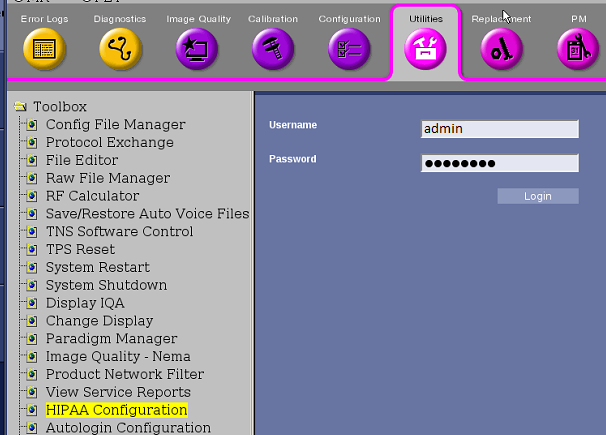
  2. Select Utilities > HIPAA Configuration.
    Figure 1. Emergency logon
  3. Click Click here to go to the link.
  4. Log on using your user name and password.
  5. Select Emergency Logon Allowed.
  6. Change the Emergency Roles options to the desired setting.
    Figure 2. Emergency logon configuration
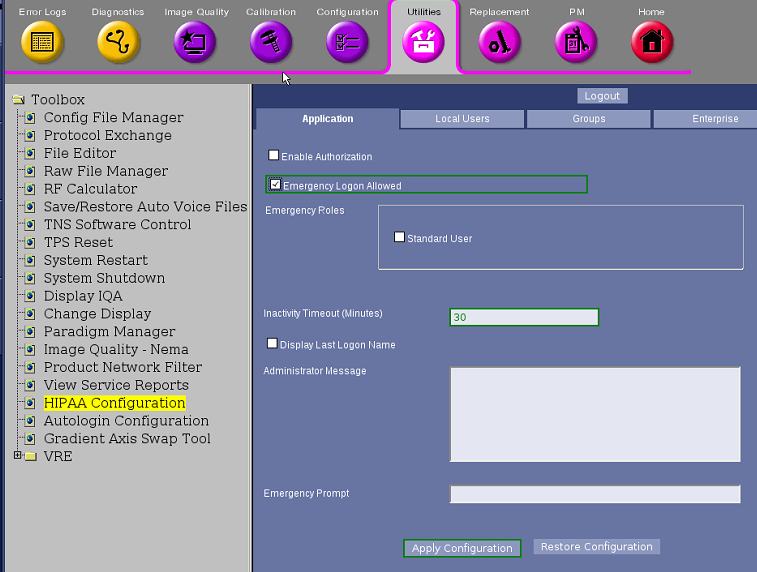
  7. Set Inactivity Timeout (Minutes) to 30.
  8. Click Apply Configuration.