• Discovery MR750 3.0T System Service Methods
  • 5690009-2EN Revision 4
  • Object ID: 00000018WIA30D5B950GYZ
  • Topic ID: id_2026015 Version: 2.3
  • Date: Oct 11, 2021 6:34:13 PM

Accessing the EA3 admin utility

Accessing the EA3 admin utility.

Prerequisites

Safety

Before working in any GE Healthcare MR suite or performing any GE Healthcare service procedure, you must:

  • Have read and understood all hazard conditions and safety requirements in the latest revision of the GE Healthcare MR Service Safety Manual (5452735).
  • Have successfully completed all relevant GE Healthcare Environmental Health and Safety (EHS) courses (or for non-GE employees, equivalent workplace training courses).
  • Comply with all site-specific training and workplace safety requirements.

If you have any safety concerns at any time, do not begin work or immediately stop work and move to a safe location. Immediately contact your supervisor or site safety officer for instructions on how to proceed.

Procedure

  1. From Tools, launch the service browser.
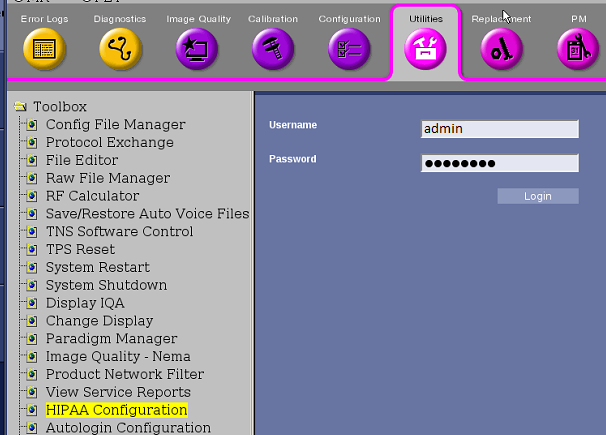
  2. Select Utilities > HIPAA Configuration.
    Figure 1. Logon
  3. Click Click here to go to the link.
  4. Log on using your user name and password.
Topic ID: task_rkv_klp_nlb

Alternate procedure to access EA3 Admin Utility

Procedure

  1. Click the Tools screen icon.
  2. Click User Accounts on the Service Desktop Manager.