- Discovery MR750w and SIGNA™ Architect T 3.0T System Service Methods
- 5690002-2EN Revision 4
- 00000018WIA30D57030GYZ
- id_123738901.5
- Oct 11, 2021 3:47:43 PM
fMRI QA Tool
Prerequisites
| Required persons | Preliminary requirements | Procedure | Finalization |
|---|---|---|---|
| 1 | 5 minutes | 15 minutes | Not Applicable |
| Item | Quantity | Effectivity | Part number | Manufacturer |
|---|---|---|---|---|
| Head TLT sphere (for 3.0T) | 1 | - |
2359877 | - |
| Head loader positioner | 1 | - |
5110241 | - |
| MRS sphere | 1 | - |
2152220 | - |
| AGAR phantom | 1 | - |
Site specific; no GE part number | - |
| 3.0T HD 8-channel high resolution brain array coil | 1 | - |
5147134-2 | - |
| 3.0T GEM QHNU coil | 1 | - |
5445051 | - |
| ||||||||

| Condition | Reference | Effectivity |
|---|---|---|
|
To ensure consistent results, the patient fan must be ON whenever you run this tool. | - | - |
About this task
Overview
This tool and procedure is available in DV24 and later.
The fMRI Quality Assurance (QA) Tool assesses the stability of the MR system. The tool measures, analyzes, plots, and reports data about long-term image temporal stability of the scanner in conformance with the fBIRN consortium. It also displays background noise, peak-to-peak stability, signal drift, mean ghost, mean ghost drift, signal-to-noise ratio (SNR), signal-to-fluctuation-noise ratio (SFNR), and mean including Weiskoff stability.
The tool runs the procedure on a 17 cm spherical phantom (TLT head, MRS, or agar) for an extended period and calculates statistics from the resulting images. These statistics provide an assessment of the system’s stability. When the stability is poor, the statistics can be used to locate the root cause. The tool can also be run routinely to monitor system stability. There are no pass/fail criteria or specifications for this test. Work with the site to determine if the results are within their tolerances.
The fMRI QA Tool can be run in 2 modes: Basic and Expert. Basic mode performs automatic acquisition using fBIRN protocol, analyzes the images, reports results, and archives the results without user intervention. Expert mode provides more user interaction, where the user can load an fMRI QA protocol matching the system configuration (wide or non-wide), load and view images, perform customizable stability and ghosting analysis, archive data, and view protocol details. Both modes are outlined below.
Scan Setup
About this task
There is no need to run a 3-plane localizer before scanning, because the tool automatically performs a phantom centering check. The tool also has a built in wait time to allow the phantom to settle before scanning.
Procedure
- Note:Place the head TLT, MRS, or agar phantom in the center of the foam positioner in the head coil.
The agar phantom is recommended if it is available. If not, use the MRS or head TLT phantom. Set the foam positioner in the center of the head coil to hold the phantom in place.
- Landmark on the center of the phantom and advance to scan.
- Turn the patient fan ON.
Basic Mode
Procedure
- From the Service Desktop, open the Image Quality tab, and select ImageQuality > fMRI QA Tool > Click here
to start this tool.
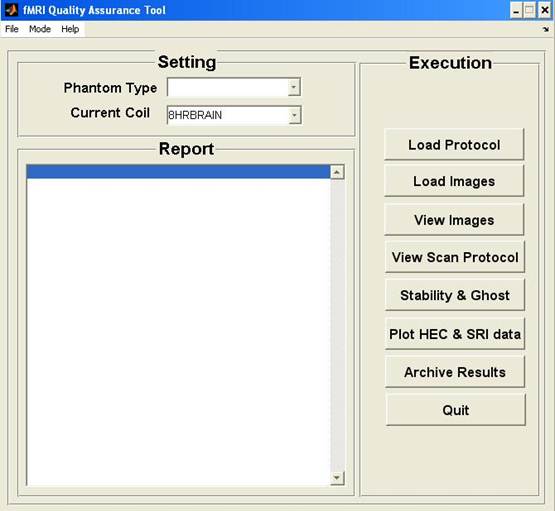
The tool starts in basic mode by default.
Figure 1. fMRI QA Tool (Basic Mode) 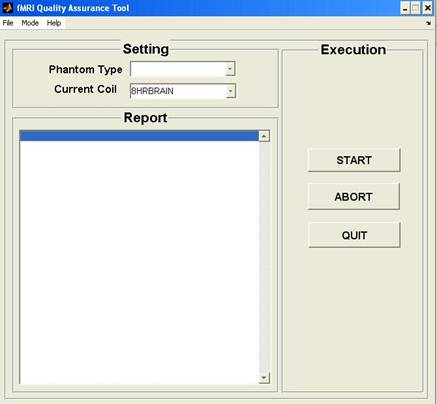
- Results are provided in a PDF file that summarizes QA scan time
and analysis mode; stability and ghosting summary with reported variables;
scan protocol; ROIs used to calculate reported variables and plots;
stability and ghosting plots; temporal average; SFNR map; comparison
of odd and even images; and noise vs time.
PDF reports are found in the /export/home/signa/tools/fMRI_QA_tool directory. The file name will begin with fMRIQAReport.
Figure 2. Example fMRI Stability Report, Stability Section 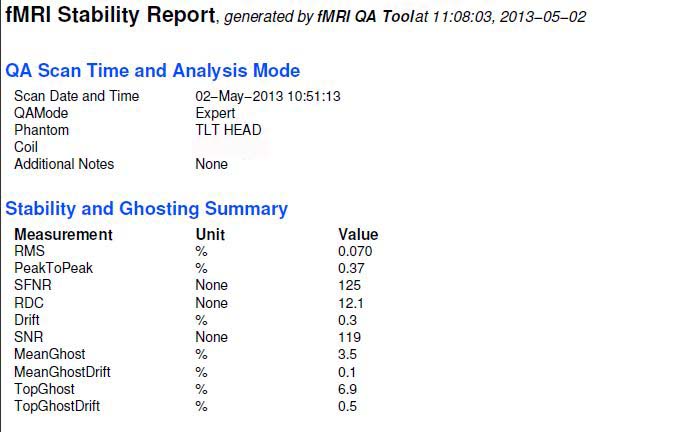
Figure 3. Example fMRI Stability Report, Plots 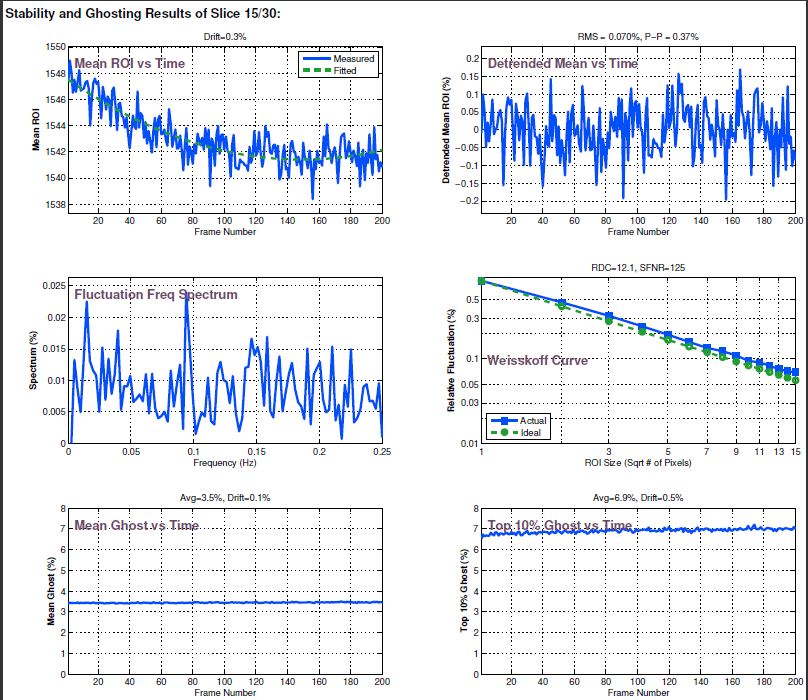
Expert Mode
Procedure
- From the Mode menu, select Expert.
Figure 4. fMRI QA Tool (Expert Mode)