- Discovery MR750w and SIGNA™ Architect T 3.0T System Service Methods
- 5690002-2EN Revision 4
- 00000018WIA30A30B40GYZ
- id_20166073.1
- Dec 8, 2021 1:47:30 PM
Removing LOTO - Global Operator Cabinet (GOC) and operator workspace
Remove LOTO from the GOC and operator workspace before restoring power to these items.
Procedure
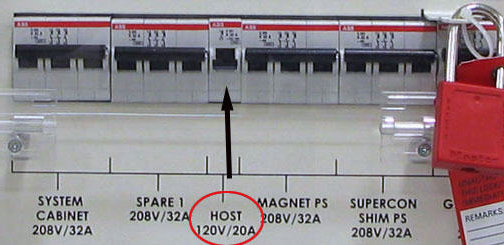
- At the front panel of the PGR PDU, switch the Host circuit breaker to the ON position.
Figure 1. GOC Power Lockout Location on PGR PDU