Discovery MR750w and SIGNA™ Architect T 3.0T System Service Methods
5690002-2EN
Revision
4
Object ID: 00000018WIA30CD4E40GYZ
Topic ID: id_2019795 Version: 2.9
Date: Feb 16, 2022 12:11:39 PM
Installing the Waveguide sub-panel
Prerequisites
The original waveguide sub-panel must be removed and replaced with the custom waveguide to allow cabling into the magnet room.
DANGER
Fatal electric shock hazard
Lethal voltages are present in the PGR Power Distribution Unit (PDU) or gradient cabinet.
Perform a system shutdown, and then perform LOTO on the main PDU breaker and the penetration cabinet. The capacitors may have 800 volts. Wait at least five minutes after LOTO for the capacitors to drain before continuing this procedure.
DANGER
Fatal Electric Shock Hazard
Coldhead (cryocooler compressor) presents a shock hazard.
Turn off and perform LOTO on the coldhead before continuing this procedure. See the MR Service Safety Manual (5452735).
Perform LOTO on the Heat Exchanger Cabinet (HEC) to remove power from the cryocooler compressor, which is necessary to complete this procedure. See Applying LOTO - HEC.
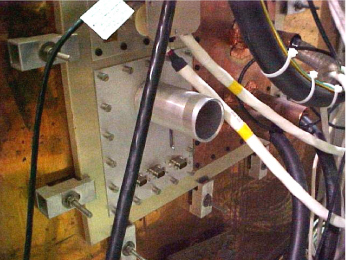
Install the custom waveguide panel (2394034-10) in place of the standard panel.
Figure 1. Sub-panel
Note: If the waveguide panel has preexisting (custom) modifications, they must be reapplied to the sub-panel before BrainWave can be installed.


 Note: If the waveguide panel has preexisting (custom) modifications, they must be reapplied to the sub-panel before BrainWave can be installed.