- id_13106853
- Version: 3.0
- Date: Aug 29, 2019 1:56:57 AM
1.5T 8-Channel CTL Setup for MCQA Test
Prerequisites
| Required persons | Preliminary requirements | Procedure | Finalization |
|---|---|---|---|
| 1 | Not Applicable | 15 minutes | Not Applicable |
| Item | Quantity | Effectivity | Part number | Manufacturer |
|---|---|---|---|---|
| Legacy Phantom Kit, CTL Coil, 1.5T | 1 | Legacy Phantom Set |
2377426-3 |
- |
| TL Unified Phantom | 2 | Unified Phantom Set |
5343347 |
- |
| Large Cylindrical Unified Phantom | 1 | Unified Phantom Set |
5342679 |
- |
| Condition | Reference | Effectivity |
|---|---|---|
|
For Discovery MR450, Optima MR450w, and HD, the following coil configuration names must be installed to run this tool: GE_HDx 8CTL12, GE_HDx 8CTL23, GE_HDx 8CTL34, GE_HDx 8CTL45, and GE_HDx 8CTL56. For HDx legacy connectors, the following coil configuration names must be installed to run this tool: GE_8CTL12, GE_8CTL23, GE_8CTL34, GE_8CTL45, and GE_8CTL56. |
- | - |
Coils do not ship with phantoms. Phantoms come in a unified phantom set with the MR system.
Legacy Phantom Setup
Procedure
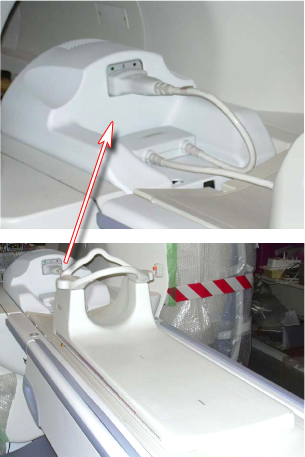
- note:Position the coil in the cradle, connect the cable as shown in Figure 1 .
If installing the coil for the first time in a system, please refer to Auto Coil Install.
Figure 1. Connecting The Coil
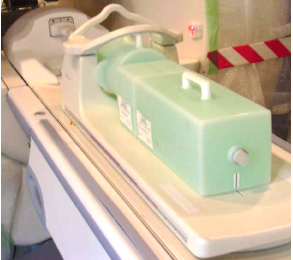
- Place the phantoms between Posterior and Anterior parts of the
coil as shown in Figure 2.
Figure 2. Positioning Phantom
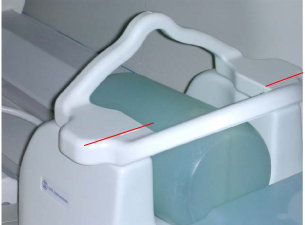
- Landmark on the coil crosshairs as shown in Figure 3.
Figure 3. Landmarking Coil
- Perform the MCQA Test if available, otherwise perform the Surface Coils SNR Test.
Unified Phantom Setup
Procedure
- Place the coil on the patient table and latch it to the table.
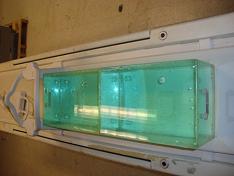
- Place the TL unified phantoms on the center of the TL section
of the coil as shown in Figure 4.
Figure 4. TL Unified Phantoms on Center
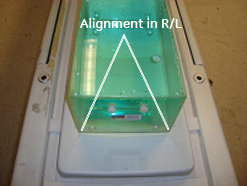
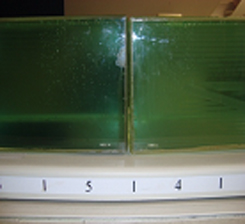
- Align the phantoms to the center in S/I and R/L directions as
shown in Figure 5 and Figure 6.
Figure 5. Alignment in S/I
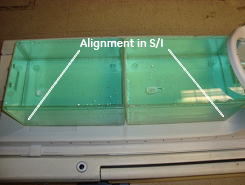
Figure 6. Alignment in R/L
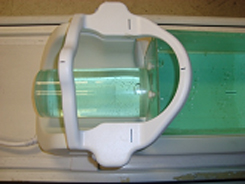
- Place the large cylindrical unified phantom on the CT section
and fix the C-Spine Bridge to the hooks provided as shown Figure 7.
Figure 7. Secure the Large Cylindrical Unified Phantom
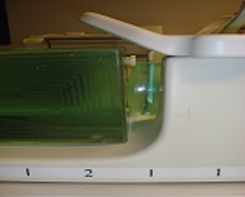
- Adjust the large cylindrical unified phantom such that it is
in complete contact with the TL unified phantom (see Figure 8).
Figure 8. Adjust the Large Cylindrical Phantom
- Adjust TL unified phantoms such that both the phantoms are in
complete contact with each other as shown in Figure 9.
Figure 9. Adjust the TL Unified Phantoms
- Connect the coil to Port A of the system LPCA.
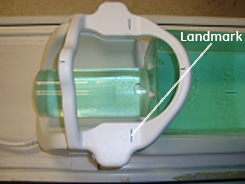
- Landmark the coil at the cross mark line on the C-Spine Bridge
(see Figure 10) and advance to scan.
Figure 10. Landmark the Coil
- Perform the MCQA Test.
Finalization
Finalization
No finalization steps.