- id_2002473
- Version: 6.2
- Date: Nov 4, 2019 11:02:20 AM
Running the LVShim tool (PM mode)
The objective of the LVShim tool is to fine-tune magnet homogeneity.
Prerequisites
| Personnel requirements | |||
|---|---|---|---|
| Required persons | Preliminary requirements | Procedure | Finalization |
| 1 | - | 10 minutes | - |
| Tools and test equipment | |||
|---|---|---|---|
| Item | Quantity | Part number | Manufacturer |
| 1 | - | ||
| LV Phantom Small Half Assembly | 1 | 2306642 | - |
| LV Phantom Big Half Assembly | 1 | 2306645 | - |
The Gradshim process is done with a sampling diameter of 22 cm DSV and the same bandwidth as LVShim Fine, which depends on the quality (good/bad) of the fine tuning. Once the scan passes and all harmonics are within specification, the magnetic field is reanalyzed in Test mode automatically at 45 DSV for customer acceptance.
Procedure
- Make sure that all coils have been removed from the cradle and phantoms from the bore.
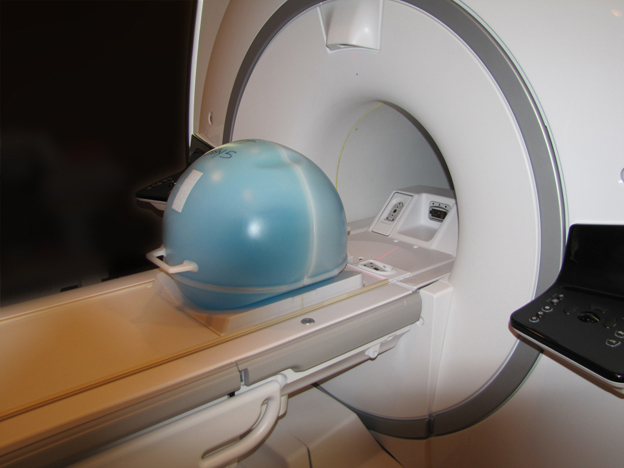
- Place the LVShim phantom on the patient table.
Figure 1. Placing the LVShim phantom on the patient table
- Set up and align the LVShim phantom. Align the phantom so that:
- The phantom’s seam is oriented perpendicular to the table.
- The phantom’s z-axis is along the length of the cradle.
- The phantom is centered left to right with respect to the cradle top.
- Landmark on the LVShim phantom crosshairs.
- Press Advance to Scan.
- (For software version 23.x or earlier) Do a phantom centering check scan and center frequency check using manual prescan, and then click [Save Frequency].
- (For software version 24.x or later) Do a phantom centering check scan.
- On the MR Service Desktop, select the PM tab, and select .The LVShim tool displays.
Figure 2. LVShim tool
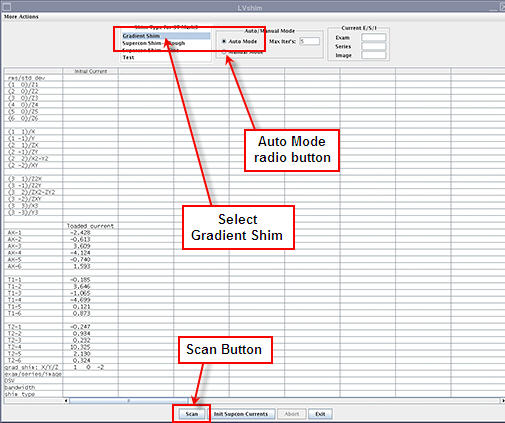
- On the LVShim tool, select:
- Gradient Shim shim type
- Auto Mode radio button
In auto mode, the tool does the following:- Sets up the protocol and collects image data
- Calculates linear harmonics and compares it with the specification
- Calculates the delta currents and the new currents based on the harmonics (dc offsets for X, Y, and Z)
- Completes multiple iterations (maximum = five) until harmonics meets the specification
- Shows the reanalysis of the last iteration in the final column in test mode (customer acceptance specification)
- Click Scan.After the scan is completed (with the Service Key still inserted), the tool compares all of the harmonics to specifications in the test mode.
- Check the results:
- Green cell = Passed specification
- Red cell = Failed specification
- When all iterations are complete and all the harmonics are within specification, click Exit in the LVShim tool.If any harmonics fail in Gradshim, re-run .