- 00000018WIA30BD1130GYZ
- id_152710872.8
- Sep 2, 2020 1:13:55 PM
Grafidy 3 Eddy Current Calibration
Prerequisites
| Required persons | Preliminary requirements | Procedure | Finalization |
|---|---|---|---|
| 1 | Not Applicable | 60 minutes | Not Applicable |
| Item | Quantity | Effectivity | Part number | Manufacturer |
|---|---|---|---|---|
| 1.5T grafidy kit (has A-port connector only, compatible with RRx receive chain systems) | 1 | - |
5135527 | - |
| 1.5T grafidy kit (has both A-port and P-port connectors, compatible with both DPP and RRx receive chain systems) | 1 | - |
5135527-7 | - |
| Service filler panel | 2 | - |
5344577 | - |
| Service foam positioner | 1 | - |
5404900 | - |
| Item | Quantity | Effectivity | Part number | Manufacturer |
|---|---|---|---|---|
| Not applicable | 0 | - | - | - |
| ||||
| Condition | Reference | Effectivity |
|---|---|---|
|
DQA II tool within specification | - | |
|
Shim within specification for rough shim. | - | - |
About this task
Overview
Disclaimer: Depending on your service agreement, not all service tools, diagnostics, and utilities referenced in this document may be accessible. Contact your sales person for information on available service license packages.
Grafidy 3 adjusts and compensates short, long, and very long time constant eddy currents for both linear and B0 terms. Use the Grafidy 3 procedure to perform eddy current compensation. Grafidy 3 should be run in Auto mode first. If Auto mode fails to bring any of the terms into specification, Manual mode and Oscillatory mode can be used.
Grafidy 3 uses a dedicated pulse sequence, six-channel fixture, and Grafidy 3 software. The Grafidy 3 fixture plugs into the LPCA for transmit/receive. No additional fixtures or cables are needed.
This tool simplifies setting up the calibration and collects data from all six coils simultaneously. The basic steps required in Grafidy 3 are:
-
Set up the six-channel Grafidy fixture.
-
Start Grafidy 3 and run the tool in Auto mode.
-
If Auto mode does not bring all terms into specification (still red in the Result/Area table), proceed to Oscillatory mode in Oscillatory Mode.
Hardware Setup
Procedure
- Connect the Hypertronics cable to the T/R board and secure with
screws. Place the fixture at the front (head coil end) of the table
with the connection box toward the bore.
Figure 1. Grafidy Hardware Setup for Flat Table 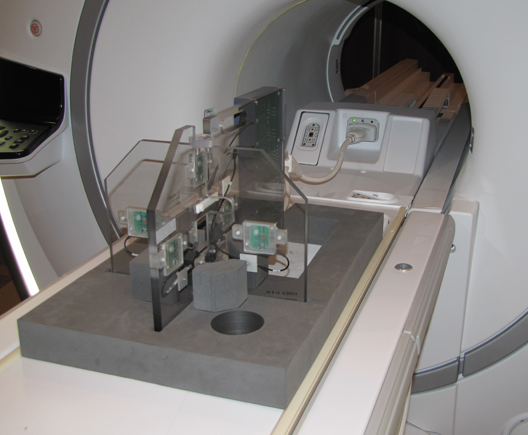
Figure 2. Grafidy Hardware Setup for Curved Table 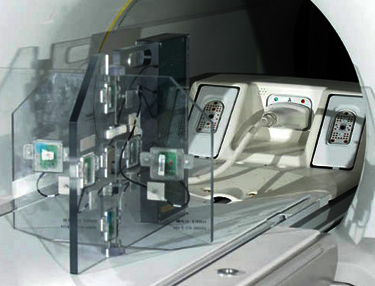
- Center the laser crosshairs on top of the fixture. Landmark
the system and press Advance to Scan.
Figure 3. Grafidy Tool and Centering Point 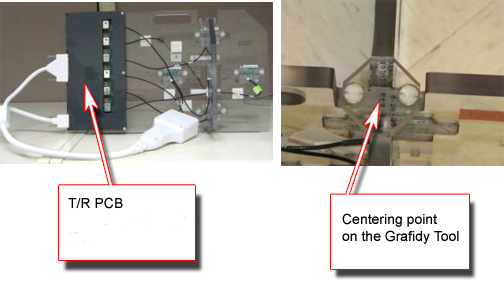
Running Grafidy 3
Procedure
- Click the Scan button to start the calibration.
-
When the scan is active, it can be stopped by pressing the Abort button and the STOP button on the keyboard.
-
Highlight the desired axis and select Show to display the result graphs. Or, on the Oscillatory tab, click Show Oscil to display the oscillatory graphs.
Figure 4. Auto Mode Setup 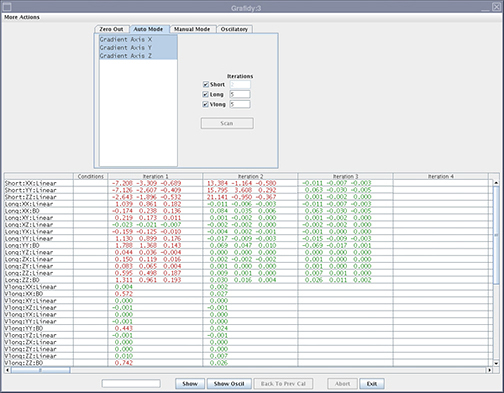
The Grafidy 3 software runs multiple scans to bring each term into specification. It iterates up to the maximum amount specified (default is five iterations). When each component finishes a scan/analysis iteration, the residual of the eddy current of the measurement displays in the results table. The results are color-coded.
Text Color Definition Red Values above specification Green Within specification -
- Review the numeric output values from the Auto mode scan. Verify
that the results of the final iteration for each component are within
specification (green).
Figure 5. Reading Output with Specifications and Actual Values (Smoothed) 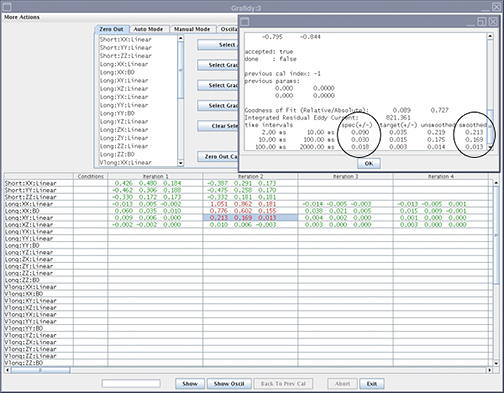
Manual Mode
About this task
Manual mode allows you to iterate through the process and decide when to stop.
Procedure
- Select the Manual Mode tab.
Figure 6. Manual Mode Tab 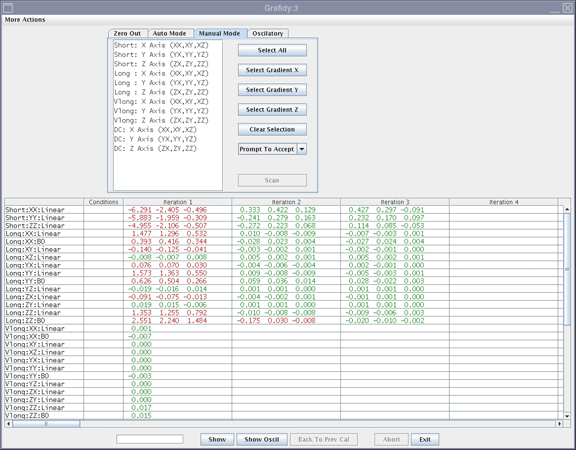
- If the Prompt To Accept mode is active,
a graph of the results displays after the scan is completed.
Figure 7. Results Window with Accept/Cancel Buttons 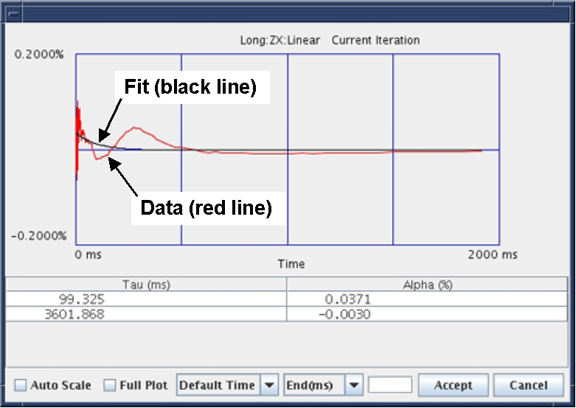
Oscillatory Mode
About this task
NOTE: After you complete the tool in Auto or Manual mode the tool will automatically enable the Oscillatory Mode. Oscillatory mode needs to be run ONLY when there is any failure seen with any of the Long compensation terms in either Auto Mode or Manual Mode. Oscillatory Mode will not help to improve the system eddy current compensation, when it is run without having any of the Long mode failure from the Auto or Manual mode, rather it could cause some harm to the system eddy current compensation.
Procedure
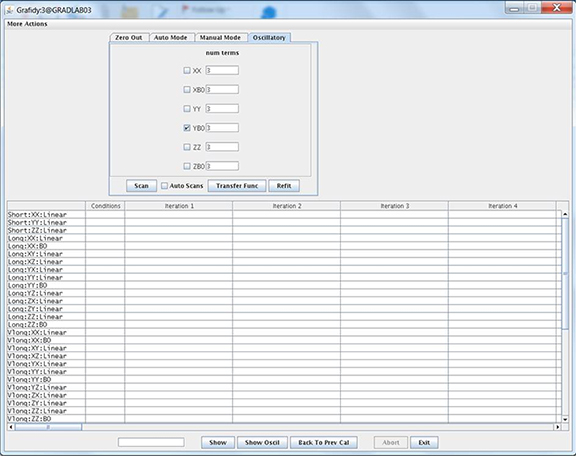
- Uncheck all of the checkboxes except for terms that failed from
Auto or Manual modes. For example, if you only noticed the Long YB0
failure from the Auto or Manual mode, check only YB0 and not the other
terms.
Figure 8. Oscillatory Mode Tab