- Object ID: 00000018WIA304A9D30GYZ
- Topic ID: id_2012850 Version: 5.0
- Date: Dec 23, 2020 10:23:03 AM
Dummy load resistance check and setup
About this task
| DANGER | |
|---|---|
Fatal electric shock hazard The RF amplifier is not disabled. To prevent fatal electric shock, make sure the RF amplifier is disabled while configuring the calibration tools. | |
Procedure
- Use a DVM to measure the resistance of input to the dummy load.
- Measure directly on the dummy load input connector – center pin to GND.
Figure 1. Measure dummy load input resistance 
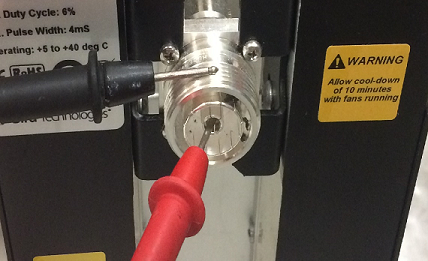
- Make sure that the resistance measures 50Ω ± 5Ω.
Notice Possible calibration failureIf the dummy load is out of specification, the calibration will fail. Do not proceed with the RF amplifier output calibration. Return the RF kit for repair.Make sure that the resistance measures 50Ω ± 5Ω.
- Measure directly on the dummy load input connector – center pin to GND.
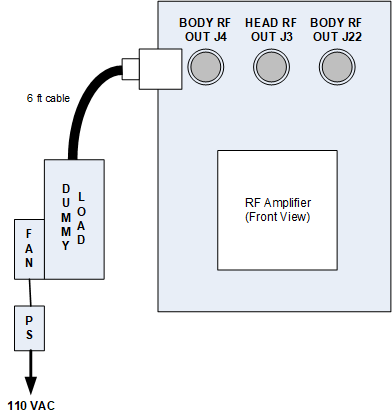
- Do the dummy load setup. Plug the fan for the dummy load into a service outlet. Never use this dummy load without its fan running.
Notice Possible equipment damageThe dummy load must be cooled or it can overheat and become damaged.Do not apply RF power to the dummy load when its fan is not on.Figure 2. Connect dummy load