• Optima MR450w BASE 1.5T System Service Methods
  • 5690012-2EN Revision 3
  • Object ID: 00000018WIA3003D010GYZ
  • Topic ID: id_2002950 Version: 3.0
  • Date: Feb 24, 2021 2:43:49 AM

Installing updates using root login

About this task

Procedure

  1. Log in as root to install updates as needed.

    Result

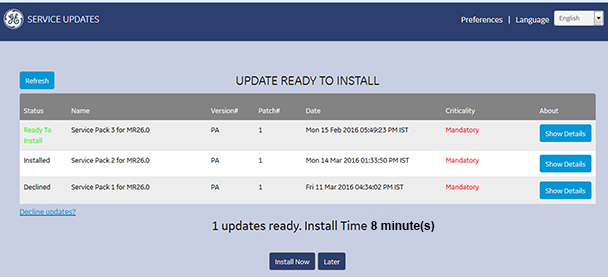
    At root log in, the user interface shown below always launches at system start up, even if there is no update available. It shows the new update and a history of updates.
    Note: It is not possible to uninstall updates with this tool.
    Figure 1. RSD root user interface
  2. Click Show Details to see details from the read me file contained in the service pack.
  3. Choose one of the following installation options.
    • Click Install Now to install the update. An installation confirmation will show when the update is complete.
      Note: Select only items of interest. If you select all files, this will increase the install time to more than 10 minutes.
    • Click Later to skip the update for the current session. The system will prompt to install the updates at the next system start up.
    • Click Decline Updates? to decline installation update. You must enter your name, role and reason for declining the update in the Decline System Update form. Click Decline Update to submit the form. A confirmation message is displayed.
      Note: You can install a declined update later as long as it has not been superseded by a newer update.