• Optima MR450w BASE 1.5T System Service Methods
  • 5690012-2EN Revision 3
  • Object ID: 00000018WIA301FC630GYZ
  • Topic ID: id_2011695 Version: 4.0
  • Date: Jul 10, 2019 4:11:53 PM

Setting the admin password - HP Z420

This is the procedure to set the password for the first time. If the password has been set previously, go to the next section.

Procedure

  1. Start the BIOS utility by turning on or restarting the computer and pressing the F10 key (or ESC, then F10 key) when Press F10 to enter setup is displayed in the lower left screen.
  2. Click the Security tab.
  3. Select Set up Password from the menu.
    Figure 1. Setting a password
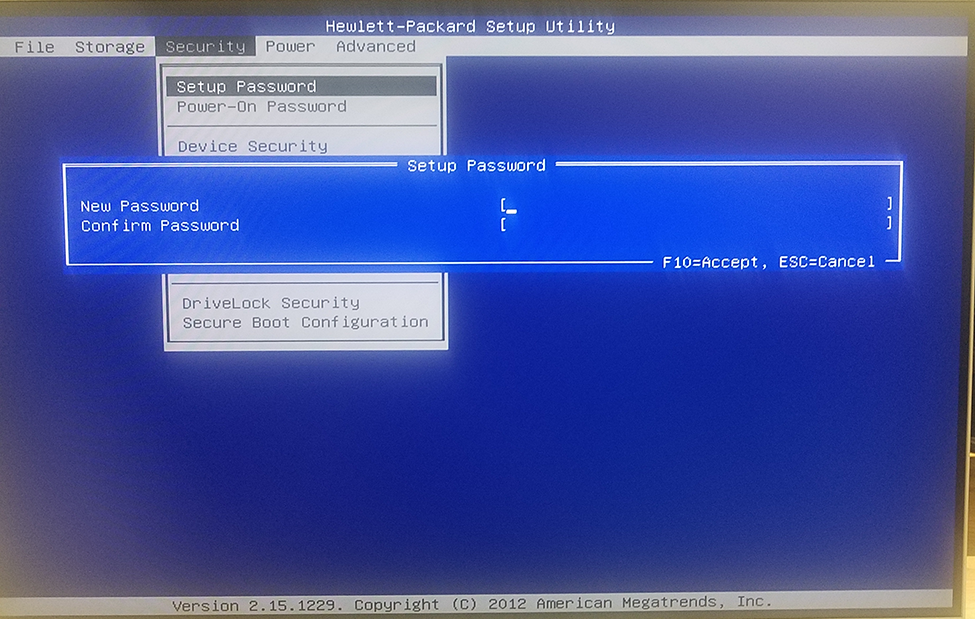
  4. In the New Password field, enter the new password.
  5. In the Confirm Password field, repeat the new password.
  6. Click F10 to accept (save) the new password.