
- Optima MR450w BASE 1.5T System Service Methods
- 5690012-2EN Revision 3
- 00000018WIA30C31F20GYZ
- id_131062733.0
- Aug 29, 2019 1:58:17 AM
GEM RT Open Array MCQA Setup
Prerequisites
| Required persons | Preliminary requirements | Procedure | Finalization |
|---|---|---|---|
| 1 | Not Applicable | 30 minutes | Not Applicable |
| Item | Quantity | Effectivity | Part number | Manufacturer |
|---|---|---|---|---|
| TL unified phantom | 2 | - |
See FRU manual | - |
| PA phantom positioner | 1 | - |
See FRU manual | - |
About this task
Note:
Coils do not ship with phantoms. Phantoms come in a unified phantom set with the MR system.
Procedure
- Position the GEM RT open array coil on the GEM table.
Figure 1. Position Coil on GEM Table 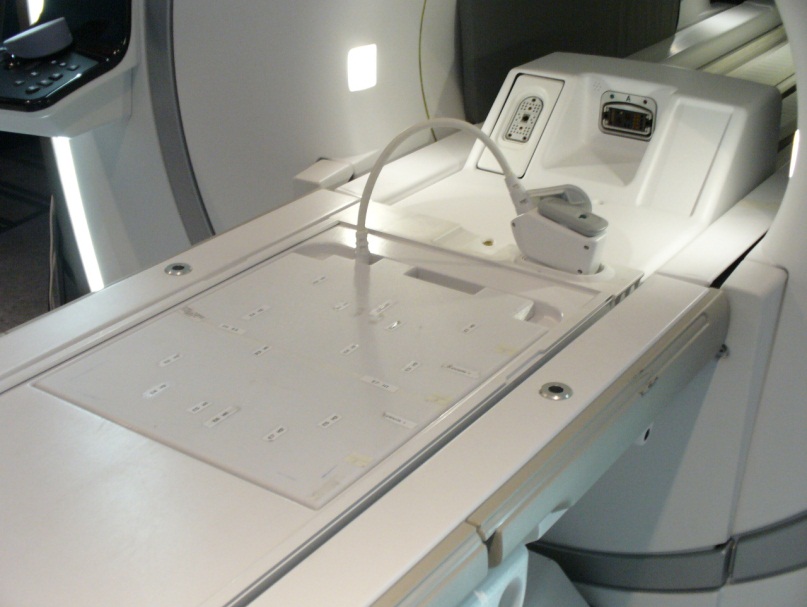
- Place two TL unified phantoms with the GEM RT open array on
the GEM table.
- Confirm that the alignment notch on the PA phantom positioner
faces toward the bore, and that the side opposite of the alignment
notch embraces the TL unified phantoms.
Figure 2. Position Phantom with Notch Closest to Bore 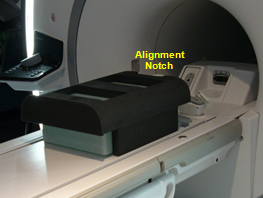
- Confirm that the edge of the lower portion of the PA phantom
positioner aligns with the edge of the GEM RT open array.
Figure 3. Phantom Position at Edge of Coil 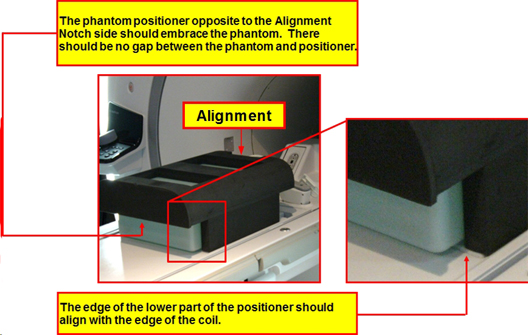
- Confirm that the alignment notch on the PA phantom positioner
faces toward the bore, and that the side opposite of the alignment
notch embraces the TL unified phantoms.
- Landmark at the edge of the hole on top of the PA phantom positioner.
Press Advance to Scan.
Figure 4. Landmark at Edge of Foam Positioner 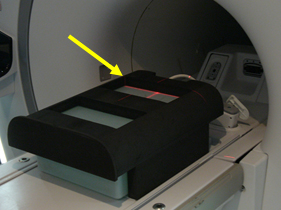
Finalization
No finalization steps.