• SIGNA™ Hero 3.0T Service Methods
  • 5852800-8EN Revision 1.0
  • Object ID: 00000018WHA30B49BGYZ
  • Topic ID: id_2002056 Version: 7.1
  • Date: Jul 13, 2021 4:05:28 PM

Calibrating RF Amplifier and UPM or RF Amp and Power Monitor (RAP) Tool

Calibrate the maximum power for the RF amplifier. Also, calibrate and check the Universal Power Monitor (UPM) or RF Amp and Power Monitor (RAP) Tool for each channel.

Prerequisites

Personnel requirements
Required personsPreliminary requirementsProcedureFinalization
1-45 minutes 5 minutes
Tools and test equipment
ItemQuantityPart numberManufacturer
RF Power Measurement Kit1Either 5307511-2 or 5307511-3 (Bird wattmeter)-
Digital Voltmeter (DVM)146-194427P284-
Required conditions
Before beginning this procedure, make sure that the exciter has been on for at least 20 minutes.
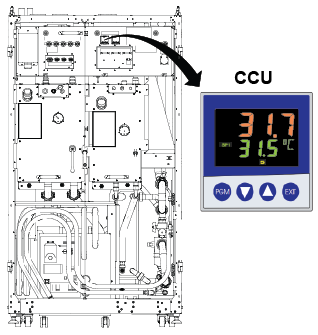
The Cabinet Cooling Unit (CCU) temperature loop must be between 29 and 35°C.
Safety

Before working in any GE Healthcare MR suite or performing any GE Healthcare service procedure, you must:

  • Have read and understood all hazard conditions and safety requirements in the latest revision of the GE Healthcare MR Service Safety Manual (5452735).
  • Have successfully completed all relevant GE Healthcare Environmental Health and Safety (EHS) courses (or for non-GE employees, equivalent workplace training courses).
  • Comply with all site-specific training and workplace safety requirements.

If you have any safety concerns at any time, do not begin work or immediately stop work and move to a safe location. Immediately contact your supervisor or site safety officer for instructions on how to proceed.

About this task

This procedure provides instructions to calibrate the maximum power for the RF amplifier and also calibrate and do a check of the power monitor calibration for each channel using the UPM Tool (For systems running PX29.0 or earlier) or the RAP Tool (For systems running PX29.1 or later) .

Use the UPM Tool or the RAP Tool to process each channel. For example, when you select head mode, the tool executes the RF amplifier calibration and, if the amplifier passes, it proceeds to the UPM calibration and then to the functional check. The process is order-dependent.

For RF amplifier calibration, process the following in order:
  1. Body channel 1.
  2. Body channel 2.
  3. Head channel.
(For PX29.1 and later) Buttons change color to keep track of task status:
  • Grey: Not started.
  • Blue: In progress.
  • Red: Error encountered or failed specs.
  • Green: Successfully completed and passed.
(For PX29.1 and later) Click File for the following menu options:
  • View Results: Open previous results file.
  • View Config: View RF and power monitor configuration file details.
  • Backup Cal Files: Backup upm*Cal.cfg files.
  • Restore Cal Files: Restore upm*Cal.cfg files.
(For PX29.1 and later) Click Tools for the following menu options:
  • Reset Average Power: Run utility to reset power monitor power.
  • Check Cal Status: Display status of current power monitor calibrations.

For each channel, adjust the RF amplifier output power first, then calibrate UPM forward and reflected power, and finally run a UPM functional check.

Procedure

  1. Confirm the Cabinet Cooling Unit (CCU) temperature loop is between 29 and 35°C.
    Figure 1. CCU temperature
  2. If the CCU temperature is below 29°C, perform a scan to warm up the CCU.
    Repeat the scan until temperature is within the required range. See Doing an ISC coolant warm up scan.
    Note: If the RF/UPM calibrations have not been done on a system, as in a new installation, the system will not allow you to scan. Proceed with the RF/UPM calibrations without the warm-up scan and make sure the CCU temperature is above 29°C at manual prescan during Adjusting RF amplifier output power for body channel 1, Step 10.