
- Discovery MR750 3.0T System Service Methods
- 5690009-2EN Revision 4
- 00000018WIA30EE1E20GYZ
- id_131064547.2
- Oct 11, 2021 6:27:53 PM
UPM - MNS functional check
Prerequisites
| Personnel requirements | |||
|---|---|---|---|
| Required persons | Preliminary requirements | Procedure | Finalization |
| 1 | - | 15 minutes | 5 minutes |
| Tools and test equipment | |||
|---|---|---|---|
| Item | Quantity | Part number | Manufacturer |
| RF Power Measurement Kit | 1 |
Either 5307511-2 or 5307511-3 (Bird wattmeter) | - |
| Digital Multimeter | 1 |
- | - |
| 3.0T 31P T/R Switch (available on site with customer) | 1 |
2354050 (non-RoHS) 5409918 (RoHS) | - |
| ||||

| Required conditions |
|---|
| Properly calibrated RF head, body, and MNS. |
About this task
This document provides instructions to perform UPM MNS functional check on both the AMT amplifier and the CPC amplifier.
MNS UPM (Universal Power Monitor) functional check setup
Procedure
- Inhibit TR faults. Disable the driver module TR fault detection in the PEN cabinet. Make sure that switch SW2 is in the TR DISABLE position.
Figure 1. Driver module front switches 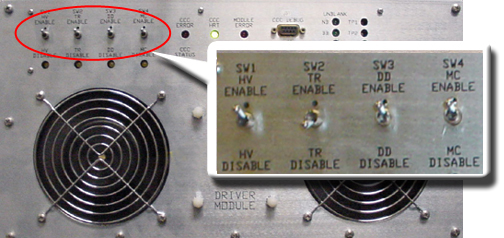
- Set RF Enable S2 on the MNS exciter to Disable (down).
Figure 2. MNS exciter RF enable S2 switch location in disable (down) 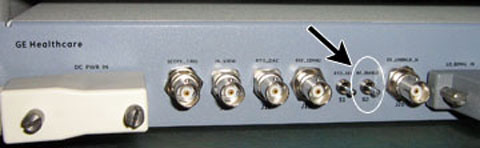
- Remove the transmission cable from RF OUT.
- (For AMT amplifier) Remove cable from J4.
- (For the GEN 1 CPC amplifier, part number 5411744) Remove cable from J3.
- (For the GEN 2 CPC amplifier, part number 5750811) Remove cable from J2.
Connect directly to the 35 kW 3.0T RF dummy load. Plug the power supply into the dummy load and the power supply into the 100 VAC service outlet in the cabinet.
Figure 3. Setup for MNS output measurement 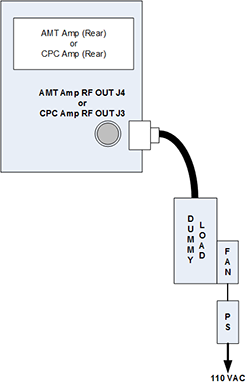
Figure 4. Coupler attached to GEN 1 CPC amplifier (J3) 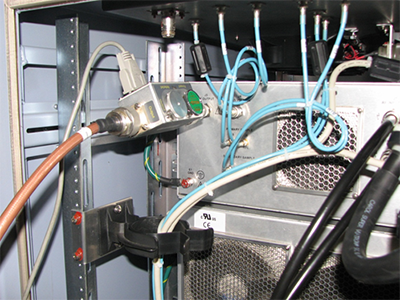
Figure 5. Coupler attached to J2 on GEN 2 power amplifier 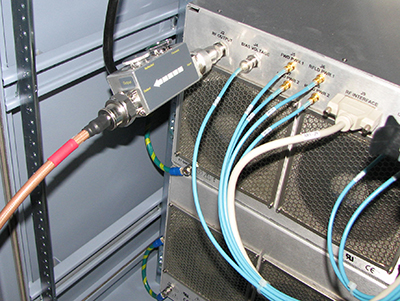
MNS UPM functional check
Procedure
Connect the MNS 31P T/R switch cabling to the LPCA A connector.Notice Figure 6. MNS 31P TR switch connection to LPCA 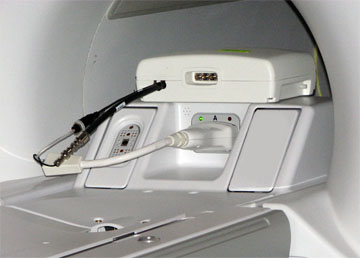
Finalization
Procedure
- Place the RF ENABLE S2 switch on the exciter module in the disable (down) position.
- Remove the cables and measurement equipment.
- Reattach the RF OUT cable.
- To re-enable fault detection, set SW2 on the driver module to the enable (up) position.
- Place RF ENABLE S2 on the exciter module to the enable (up) position.
- Complete a TPS reset.
- Any failure requires a re-calibration of the UPM system. See UPM – MNS Setup and Calibration.