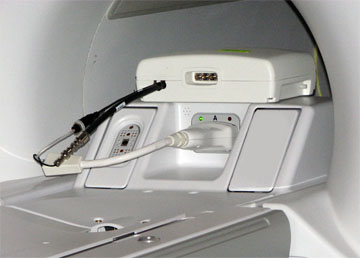
It is necessary to have a MNS T/R switch connected to the A connector.
Connect the MNS 31P T/R switch cabling to the LPCA A connector.
Figure 1. MNS 31P TR switch connection to LPCA
Landmark on the cradle in the location where the head coil would normally be, and advance to scan.
From the Common Service Desktop, access the Installation and Calibration Wizard (ICW):
For UPM calibration (MNS), click Click here to start this tool.
For the non-proprietary service tool:
Select the Calibration tab.
From the Calibration menu, select UPM Tool > Click here to start this tool.
For Nuclei select 31P.
For RF Chain, make sure MNS is selected.
Select Func Chk.
Click Start.
The tool takes full control and runs the functional test.
A prompt shows when the UPM Host Trip test completes. Look in the error log to make sure that the test completed successfully, and that a trip error occurred.
The UPM status indicates Pass or Fail.
If the test passes, select Quit from the UPM main window.