
- Discovery MR750 3.0T System Service Methods
- 5690009-2EN Revision 4
- 00000018WIA30016E20GYZ
- id_131063615.1
- Jul 13, 2021 4:05:30 PM
Loading Operator Documentation
Prerequisites
| Required persons | Preliminary requirements | Procedure | Finalization |
|---|---|---|---|
| 1 | Not Applicable | 10 minutes | Not Applicable |
| Item | Quantity | Effectivity | Part number | Manufacturer |
|---|---|---|---|---|
| DVD Media for Operator Manual | 1 | - | - | - |
About this task
All operator manuals are distributed electronically. These instructions describe how to load the operator manuals onto the system’s host computer so customers can have access to the manuals any time they are using the system.
Procedure
- In the content window on the left side, select Service
SW/Insite.
Figure 1. Guided Install 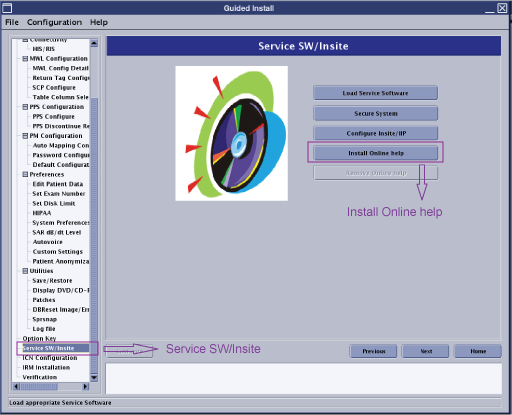
- A pop-up menu appears. Select the language that is to be used
for the online help and press Install.
Figure 2. Select Language for Online Help 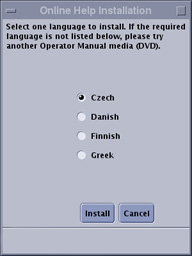
If the language you want is not on the menu, try another operator manual DVD.
- After the installation is complete, a message appears indicating
that the installation was successful. Remove the DVD from the drive.
Figure 3. Message: Installation Complete 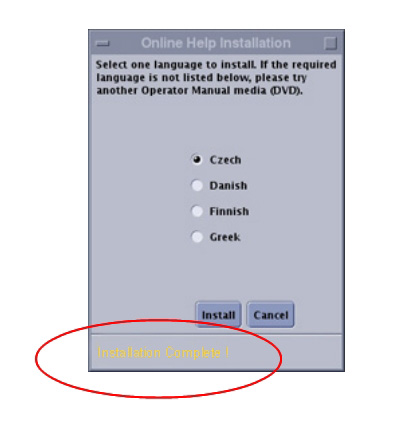
Finalization
No finalization steps.