
- Discovery MR750 3.0T System Service Methods
- 5690009-2EN Revision 4
- 00000018WIA30C24840GYZ
- id_20148824.10
- Nov 1, 2021 5:15:00 PM
Installing the host computer - Dell T5820
Install the host computer.
Prerequisites
| Personnel requirements | |||
|---|---|---|---|
| Required persons | Preliminary requirements | Procedure | Finalization |
| 1 | - | 30 minutes | - |
| Tools and test equipment | |||
|---|---|---|---|
| Item | Quantity | Part number | Manufacturer |
| Screwdriver | 1 | - | - |
| ESD Strap | 1 | - | - |
| Consumables | |||
|---|---|---|---|
| Item | Quantity | Part number | Manufacturer |
| GE Equipment Maintenance Sticker Note: Not needed for hard drive or DVD replacement procedures. | 1 | 5661793 | - |
| Replacement parts | |||
|---|---|---|---|
| Item | Quantity | Part number | Manufacturer |
| Dell T5820 MR Global Host W-2123 64GB Nvidia SSD | 1 | 8780011-02 | - |
| GOC Dust Filter for T5820 | 2 | 5793940 | - |
| Adhesive-Backed Velcro, 2 x 4 inches | 1 | 46-317475P2 | - |
Procedure
- Connect the computer cables and make sure all connections to the GOC and host computer are secure.
Figure 1. Dell T5820 cable configuration 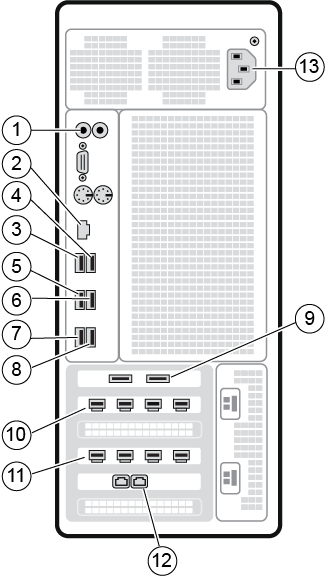
Table 1. Dell T5820 cable configuration Item Run # Description 1 NA Line In/Out cable to GOCAA J12/14 2 NA Site network Ethernet cable 3 NA Mouse USB cable 4 E3048 Keyboard USB extender cable to keyboard USB cable 5 E3037 ICE USB extender cable 6 NA USB-RS422 Converter USB cable to USB-RS422 Converter 7 NA IRDC USB cable to IRDC J1 8 NA NA 9 NA NA 10 NA IRDC mini DP cable to IRDC J2 11 E3046 Host LCD Monitor mini DP cable to Host LCD Monitor 12 E3011 ETH1 (right port) cable to PGR J2 13 NA Power cable - Remove the dust filter and Velcro strips from the old computer and examine them for reusability.
Figure 2. Dust filter attachment 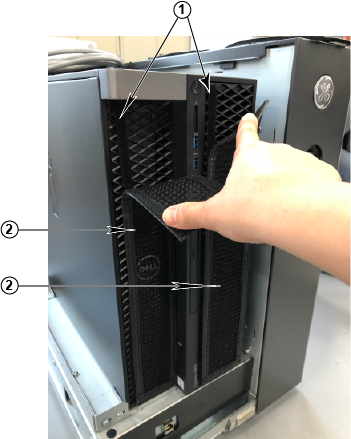
1 Velcro strips 2 Dust filter