
- Discovery MR750 3.0T System Service Methods
- 5690009-2EN Revision 4
- 00000018WHA30B89BGYZ
- id_20021098.23
- Aug 17, 2021 3:10:00 PM
Setting up for HOEC calibration scan
About this task
The configuring process is different depending on the type of software you are using. Please select the appropriate procedure for configuring HOEC calibration hardware.
Setting up for HOEC calibration scan for DV26.0 or earlier
About this task
Procedure
- Set up and align the LVShim phantom. Align the phantom so that:
- The phantom’s seam is oriented perpendicular to the table.
- The phantom’s z-axis is along the length of the cradle.
- The phantom is centered left to right with respect to the cradle top.
Figure 1. Placing the LVShim phantom on the patient table Note: This image is a representative example. Actual systems may vary.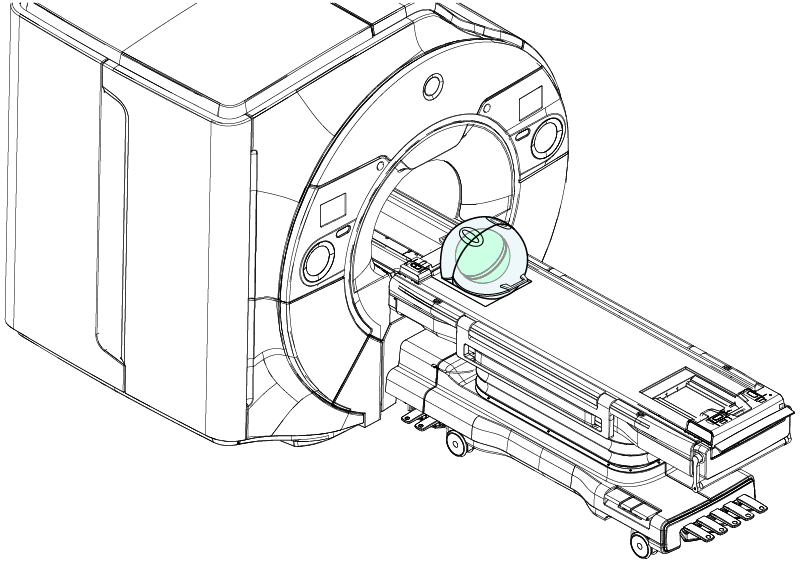
Setting up for HOEC calibration scan for DV29.1 or later
About this task
Procedure
- Set up the LVshim center sphere in the middle of the table on the Universal Phantom Pad.
- Put the sphere on the pad with the strap (in the groove) in the orientation shown below.
Figure 2. Placing the LVShim phantom on the patient table Note: This image is a representative example. Actual systems may vary.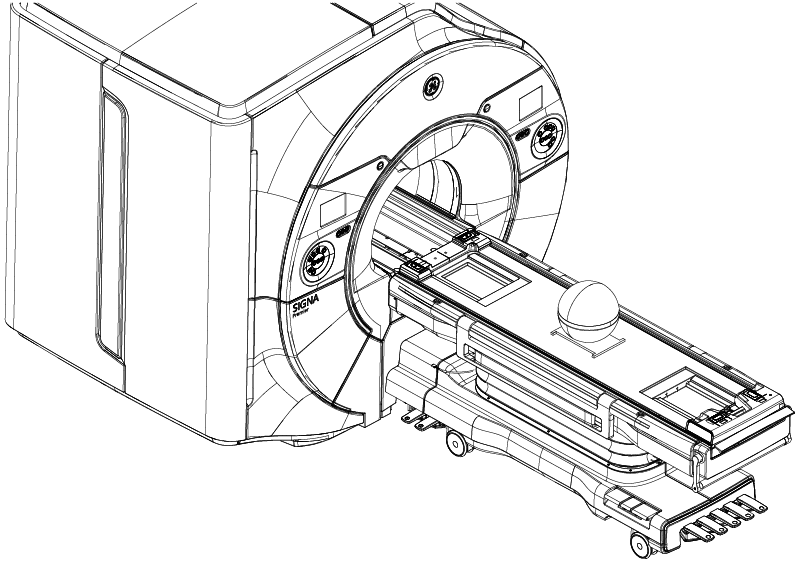
- Put the sphere on the pad with the strap (in the groove) in the orientation shown below.