• Discovery MR750 3.0T System Service Methods
  • 5690009-2EN Revision 4
  • Object ID: 00000018WIA30930B40GYZ
  • Topic ID: id_2016606 Version: 3.1
  • Date: Dec 8, 2021 1:47:43 PM

Applying LOTO - Global Operator Cabinet (GOC) and operator workspace

Apply LOTO before servicing the GOC or items in the operator workspace. Applying LOTO ensures a safe environment when working on these items.

Prerequisites

Personnel requirements
Required personsPreliminary requirementsProcedureFinalization
1Not Applicable10 minutes Not Applicable
Tools and test equipment
ItemQuantityPart numberManufacturer
RED Logout Tagout Lock with Each Lock Uniquely Keyed 25451778-
Multi-Locking Device (if multiple service personnel are involved)146-194427P313-
Red Warning LOTO Tag146-194427P322-
Safety

Before working in any GE Healthcare MR suite or performing any GE Healthcare service procedure, you must:

  • Have read and understood all hazard conditions and safety requirements in the latest revision of the GE Healthcare MR Service Safety Manual (5452735).
  • Have successfully completed all relevant GE Healthcare Environmental Health and Safety (EHS) courses (or for non-GE employees, equivalent workplace training courses).
  • Comply with all site-specific training and workplace safety requirements.

If you have any safety concerns at any time, do not begin work or immediately stop work and move to a safe location. Immediately contact your supervisor or site safety officer for instructions on how to proceed.

Procedure

  1. Notify affected personnel that LOTO will be applied.
  2. Make sure the host computer is shut down.
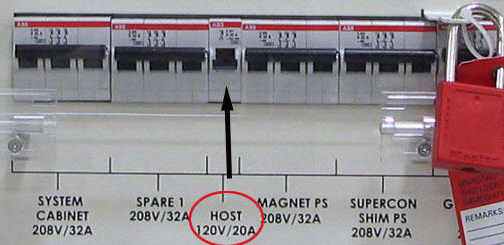
  3. At the front panel of the PGR (Power, Gradient, RF Cabinet) PDU, switch the Host circuit breaker to the OFF position.
    Figure 1. GOC Power Lockout Location on PGR PDU
  4. At the front panel of the PGR PDU covering the circuit breaker switches, apply a personal LOTO device for each FE working on the equipment.
  5. Remove right side cover from Host PC cabinet.
  6. Using a DVM, verify 0VAC at the power strip supplying the cabinet.