
- Discovery MR750w and SIGNA™ Architect T 3.0T System Service Methods
- 5690002-2EN Revision 4
- 00000018WHA30569BGYZ
- id_20020739.14
- Jul 13, 2021 4:05:21 PM
Doing UPM functional check for body channel 2
The UPM functional check runs a prescribed scan in the forward power. It compares the measured RF power from the UPM to the expected value stored in the UPM configuration file.
Procedure
- For body channel 2, disconnect J4 and J22, connect the dummy load to J22, and connect the 3/16 inch wavelength stub cable to J4.
Figure 1. Connect dummy load 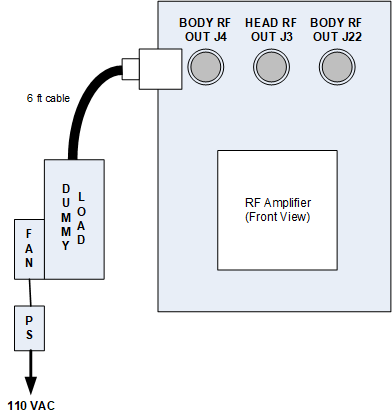
- Note: Be sure to check the resistance as noted in the Dummy load resistance check and setup procedure, prior to starting the UPM functional check.In the tool, make the following functional check selections:
Figure 2. UPM functional check selections for body channel 2 (For system running DV29.0 or earlier)
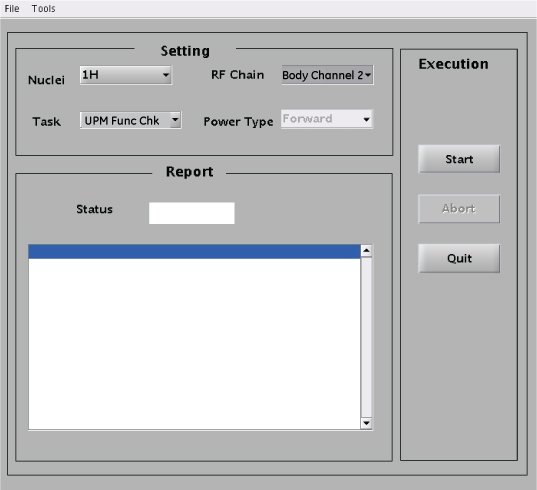
Setting Value Nuclei 1H Task UPM Func Chk RF Chain Body Channel 2 Note: The Power Type drop-down menu is inactive for this step.Figure 3. RF Amp and Power Monitor (RAP) Tool functional check selections for body channel 2 (For system running DV29.1 or later)
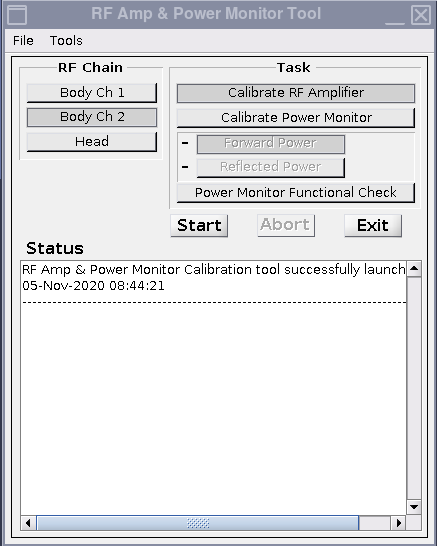
Setting Value Task Power Monitor Functional Check RF Chain Body Channel 2