Driver Module Lite
Prerequisites
Procedure
- Remove L Upper Front Cover. Refer to SC Cover Removal.
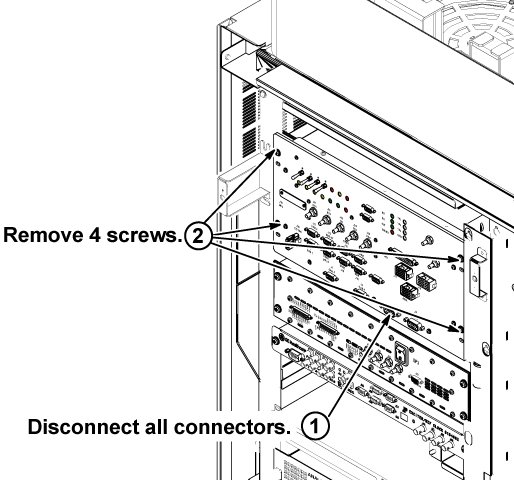
- Disconnect all connectors from front panel of Driver Module Lite.
- Remove 4 screws fixing driver module lite and chassis.
Figure 1. Driver Module Lite screws
- Draw Driver Module Lite until it stops at stopper position.
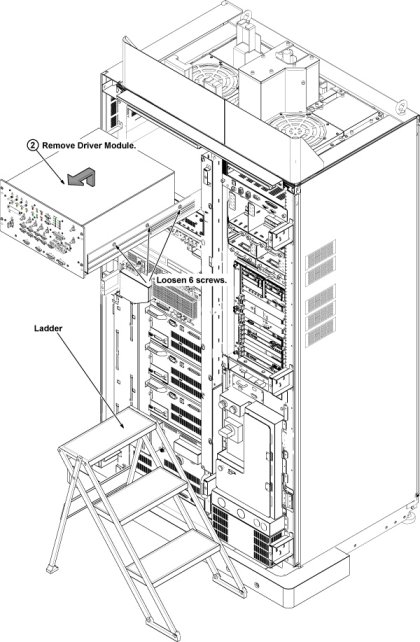
- Loosen 6 screws fixing unit and tray.
- Remove Driver Module Lite from chassis using ladder.
- Replace side brackets by removing 4 screws from removed driver
module lite to new driver module lite.
Figure 2. Driver Module Lite Replacement
- Restore System cabinet.
1 Finalization
Procedure
- Restore the Power. Refer to System Cabinet PDU Main Breaker LOTO Procedure.
- Perform SPT Head SNR and SPT Body SNR test by selecting from the tests from the SPT menu. Refer to SPT Full Test Mode Procedure.
- Perform MCR III Tool .