16CH RRx Replacement (Mobile Site)
Prerequisites
Procedure
- Remove covers.
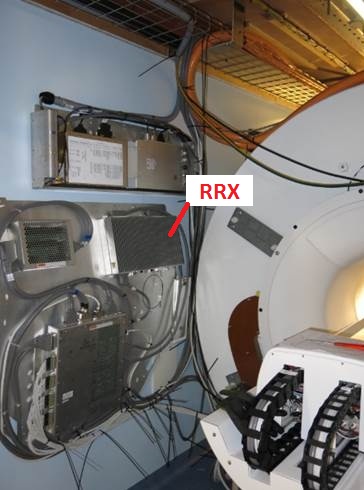
- RRX is located on the wall.
Figure 1. RRX Location
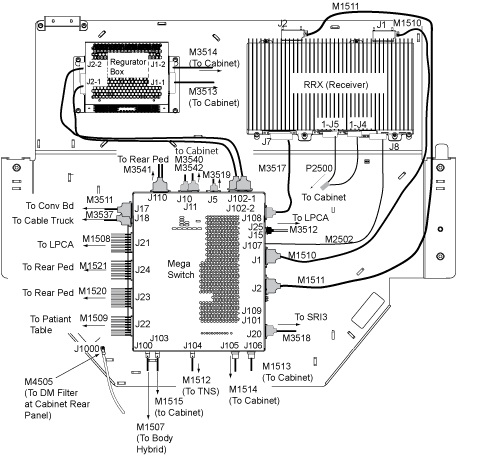
- Disconnect the bottom cables from J7, J5, J4, J8. note: Handle the Fibre Optic cables with care, they are very fragile.
Figure 2. RRX Cable Removal
 caution
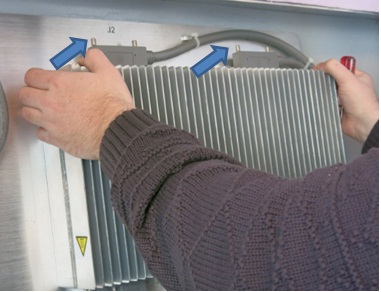
- Loosen 4 screws.
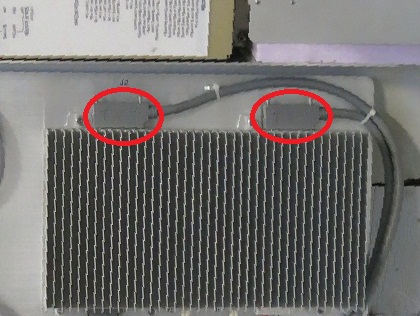
- Pull out a little and disconnect the top 2 cables from J1, J2.
Figure 3. Pull out a little and disconnect J1, J2
- Restore it by the reverse order of the removal.
 |
Finalization
- Restore the Power. Refer to System Cabinet PDU Main Breaker LOTO Procedure.
- Perform the following Diags and confirm that all of the tests are passed.
- Perform System Gain Calibration.
- Perform one Body or Head Scan.
- Perform SPT Coherent Noise Test . note: Perform SPT Coherent Noise Test Only by selecting 'No' for 'Select All Tests?' and 'ON' for 'Coherent Noise'. No need to perform SPT Full test.