- id_2015614
- Version: 2.1
- Date: Feb 4, 2020 11:34:48 AM
Setting the boot sequence - Dell T5810 (MR28 or later)
Specifies the order of host computer boot devices.
Prerequisites
| Personnel requirements | |||
|---|---|---|---|
| Required persons | Preliminary requirements | Procedure | Finalization |
| 1 | - | 5 minutes | - |
Procedure
- Turn on or restart the computer. Press F2 to enter the BIOS Setup menu. note: Optionally, press F12, then select the BIOS Setup menu.
- In the Settings pane, expand the General menu.
- Select the Boot Sequence option.
Figure 1. Boot sequence setup
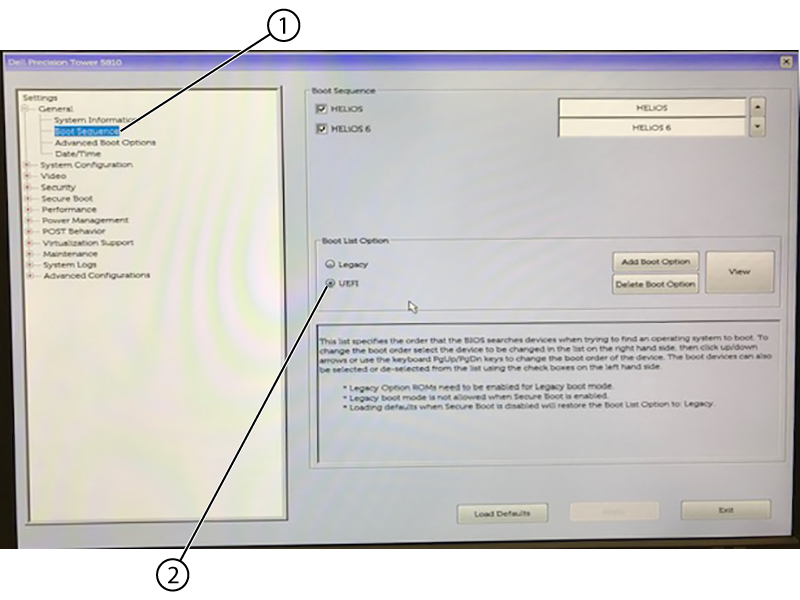
1 Boot sequence 2 UEFI - In the Boot Sequence pane, select UEFI in the Boot List Option area.note: All of the other options are auto-selected.
- At the bottom of the screen, click Apply, then click Exit to save changes and exit BIOS.
- If you are setting up the computer for the first time, see Setting the BIOS password - Dell T5810/T5820.