- id_13107396
- Version: 3.0
- Date: Aug 29, 2019 1:42:35 AM
Adjusting the intercom for the GOC audio box
Adjust the minimum and maximum volume of the keyboard speaker (patient’s voice) and the maximum volume of the patient speaker (operator's voice).
Prerequisites
| Required persons | Preliminary requirements | Procedure | Finalization |
|---|---|---|---|
| 2 | 10 minutes | 30 minutes | 10 minutes |
Overview
Procedure
- This document describes how to adjust the maximum volume and minimum
volume of the Patient’s voice, in the magnet bore. Also, describes how
to adjust the maximum volume of Operator's voice.
Figure 1. Volume on SCIM
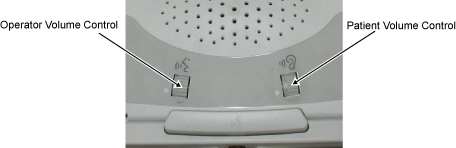
Operator Volume Control Controls the speaker volume in the bore (operator’s voice). Patient Volume Control Controls the volume of the speaker from the keyboard (patient’s voice). - Audio assembly is located in the GOC. The following is the volume location of audio assembly.
Figure 2. Access the intercom board
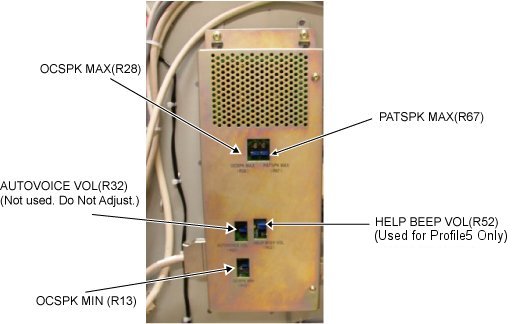
OCSPK MAX (R28) Maximum keyboard speaker volume R28 (patient’s voice) OCSPK MIN (R13) Minimum keyboard speaker volume R13 (patient’s voice) PATSPK MAX (R67) Maximum patient speaker volume R67 (operator’s voice) - The following adjustments are performed.
- Maximum Keyboard Speaker Volume R28 (Patient’s Voice)
- Minimum Keyboard Speaker Volume- R13 (Patient’s Voice)
- Maximum Patient Speaker Volume R67 (Operator’s Voice)
note: Minimum Patient Speaker Volume is fixed and there is no volume for it.note: Do NOT adjust R32. R52 is used only for Profile5. Do not adjust R52 if system is not Profile5.
Accessing the intercom board
Procedure
Maximum keyboard speaker volume R28 (patient’s voice)
Procedure
- At the Operator Workspace keyboard, set the Patient Volume Control at
maximum, by rotating the volume wheel UP with your finger, (Clockwise).
Figure 3. VOLUME CONTROLS
- One-person talks into the patient microphone in the magnet bore. The second person adjusts R28 on the Intercom Board for the desired maximum volume at the keyboard speaker. This is an iterative process. Repeat the voice test until the maximum desired level is achieved.
Minimum keyboard speaker volume- R13 (patient’s voice)
This section adjusts the minimum volume of the Patient’s voice, in the magnet bore. The Operator benefits from this adjustment.
Procedure
- At the Operator Workspace keyboard, set the Patient Volume Control at
minimum, by rotating the volume wheel down with your finger. (counterclockwise).
Figure 4. VOLUME CONTROLS
- One person should listen at the keyboard speaker (Patient’s Voice). The other person talks into the patient microphone in the magnet bore. The person at the keyboard should make minor adjustments to R13 on the Intercom Board for the desired minimum volume at the keyboard speaker. This is an iterative process. Make a slight adjustment to the potentiometer, test the volume and repeat the voice test until the desired Minimum Volume level has been achieved.
Maximum patient speaker volume R67 (operator’s voice)
Procedure
- At the Operator Workspace Keyboard, set the patient volume control at
maximum by rotating the Operators volume wheel UP with your finger, (Clockwise).
Figure 5. VOLUME CONTROLS
- One person listens at the patient speaker. The other person talks into
the keyboard microphone and adjusts R67 on the Intercom Board for the desired
maximum volume at the keyboard speaker. This is an iterative process. Repeat
the voice test until the maximum desired level is achieved. note:
1. If R67 is turned to clockwise too much, howling sound may be heard from Patient Speaker. Adjust R67 not to cause this problem.
2. Set the Operator Volume to “4” and check that howling sound is not heard. (As a result of the experiment, howling sound is often heard when Operator Volume is set to “4”)
Patient alarm check (Signa Profile5 System Only)
Procedure
- Check that the Patient Alarm sound can be heard from OCSPK when pushing the PANIC SW at Table in Magnet Room.
- If it is necessary to adjust the volume of Patient Alarm, adjust HELP BEEP VOL(R52) on GOC AUDIO BOX.
Finalization
Procedure
- Restore the GOC.
- Perform a head and body scan to ensure system functionality.