Install the host computer.
Prerequisites
| Personnel requirements |
|---|
| Required persons |
Preliminary requirements |
Procedure |
Finalization |
|---|
| 1 |
- |
30 minutes |
- |
| Tools and test equipment |
|---|
| Item |
Quantity |
Part number |
Manufacturer |
|---|
| Screwdriver |
1 |
- |
- |
| ESD Strap |
1 |
- |
- |
| Consumables |
|---|
| Item |
Quantity |
Part number |
Manufacturer |
|---|
| GE Equipment Maintenance Sticker note: Not needed for hard drive or DVD replacement procedures.
|
1 |
5661793 |
- |
| Replacement parts |
|---|
| Item |
Quantity |
Part number |
Manufacturer |
|---|
| Dell T5820 MR Global Host W-2123 64GB Nvidia SSD |
1 |
8780011-02 |
- |
| GOC Dust Filter for T5820 |
2 |
5793940 |
- |
| Adhesive-Backed Velcro, 2 x 4 inches |
1 |
46-317475P2 |
- |
Procedure
- Carefully put the computer back inside the GOC brackets. Secure the brackets as needed.
- Attach and tighten the strap(s) to secure the computer.
- Connect the computer cables and make sure all connections to the GOC and host computer are secure.
- Remove the dust filter and Velcro strips from the old computer and examine them for reusability.
Figure 1. Dust filter attachment
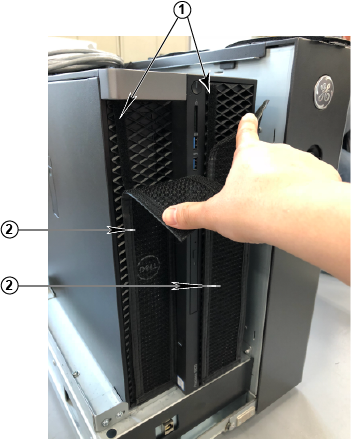
| 1 |
Velcro strips |
| 2 |
Dust filter |
- Install the Velcro strips on the computer.
- If you can reuse the Velcro strips, install them.
- If you cannot reuse the Velcro strips, install a new set.
- Install the dust filter.
- If you can reuse the dust filter from the old computer, then clean and install it.
- If you cannot reuse the dust filter, then install a new one.
- Connect the short ground lead that connects the left side panel to the GOC main chassis at the center of the lead.
- Secure the left side panel to the GOC.
- Get a GE equipment maintenance sticker, and write today's date on the sticker. Put the sticker on the GOC where it is easily visible.
note: When replacing the hard drive or DVD drive, a maintenance sticker is not required.